Roblox voice chat lets eligible players speak to others inside supported experiences instead of relying only on text chat. However, the feature is not switched on automatically for every account.
To get voice chat on Roblox, the account holder must be at least 13, complete an age check using ID verification or Facial Age Estimation, live in a supported region and join an experience that supports voice.
Once eligible, the player can select the headphone icon or open the in-experience settings and turn on Voice Chat. Phone-number verification alone no longer unlocks the feature.
What Do You Need to Get Voice Chat on Roblox?
Before trying to enable the microphone, check that the account meets all the main requirements.
| Requirement | What it means |
| Minimum age | The account holder must be 13 or older. |
| Age check | Roblox requires ID verification or Facial Age Estimation. A verified phone number by itself is not enough. |
| Supported region | Voice chat and certain age-checking options are not available in every country. |
| Compatible device | Voice is supported on desktop, mobile, VR, PlayStation and Xbox, subject to regional and account eligibility. |
| Supported experience | The game developer must have enabled voice communication for that experience. |
| Microphone access | Roblox needs permission to use the device’s microphone. |
Players cannot legitimately bypass the age check. Changing the birthday to a false date, using somebody else’s identification or installing a supposed “voice chat unlocker” may put the account and personal information at risk.
How to Enable Voice Chat on Roblox?
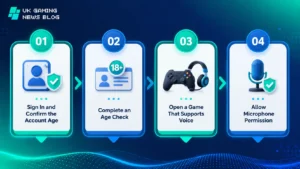
The exact button positions can vary slightly between devices and Roblox app versions, but the eligibility and activation process is broadly the same.
1. Sign In and Confirm the Account Age
Log in to the correct Roblox account and open Settings. Go to Account Info and check the birthday or displayed age group.
If the account is genuinely owned by someone aged 13 or over but shows an incorrect birthday, use Roblox’s account or support options to correct it. Do not enter a false age simply to gain access to communication features.
2. Complete an Age Check
Under the birthday or age-group information, select the available age-check option.
Roblox may offer one or both of the following methods, depending on the account and region:
- ID verification: Follow the on-screen process and scan a valid government-issued photo ID, such as a passport, driving licence or residence card. Camera access may be required.
- Facial Age Estimation: Follow the prompts to take the requested facial image or video so the system can estimate whether the user is old enough.
Complete every step and wait for the account’s age status to update. Verifying only an email address or phone number will not provide voice access under the current requirements.
3. Open a Game That Supports Voice
Launch a Roblox experience with voice communication enabled. Voice is not a universal feature that automatically works in every Roblox game. Testing it in an unsupported experience can therefore make a correctly configured account appear ineligible.
Once the experience loads, look for the headphone icon. Selecting it should connect the player to voice. The same control may also appear under the Roblox menu’s in-experience Settings, where Voice Chat can be switched on or off.
4. Allow Microphone Permission
The device may display a permission request the first time Roblox tries to use the microphone. Select Allow. If the prompt was previously declined, the permission must be changed through the device’s privacy settings.
After joining voice, check that the microphone is not muted in Roblox, on the headset or in the device’s sound controls.
How to Get Roblox Voice Chat on Different Devices
The Roblox eligibility rules remain the same across devices, but microphone settings differ.
PC or Mac
Complete the age check through the account settings, launch a supported experience and select the headphone icon.
If the microphone does not work, open the computer’s privacy settings and allow Roblox to access it. The correct input device should also be selected in the operating system, especially when several webcams, headsets or microphones are connected.
iPhone, iPad or Android
Open a voice-enabled experience in the Roblox app and connect through the headphone icon or in-experience settings.
If there is no audio input, check the phone or tablet settings and give Roblox microphone permission. Updating the Roblox app can also resolve missing or outdated controls.
PlayStation 4 or PlayStation 5
Eligible users can connect through the in-experience settings by choosing the option to join voice. A compatible microphone or headset must be available, and the console’s privacy, family and audio settings must permit communication.
Xbox
Roblox voice chat is available on supported Xbox consoles for eligible accounts. Join a compatible experience, connect to voice and confirm that the headset is assigned to the active Xbox profile.
Xbox party chat is separate from Roblox in-experience voice. Leaving or changing the party-chat connection may help when game voice cannot be heard.
VR Headsets
Voice availability depends on the Roblox-compatible headset, operating environment and individual experience. The Roblox account still needs to pass the 13+ age check, and both the headset software and Roblox must have microphone permission.
Why Is the Roblox Voice Chat Option Not Showing?
When the headphone icon or Voice Chat control is missing, one of the following usually explains it.
| Problem | What to check |
| Account is under 13 | Voice chat cannot be enabled for an under-13 account. |
| Age check is incomplete | Return to Account Info and check whether the ID or facial age process finished successfully. |
| Only a phone number was verified | Complete ID verification or Facial Age Estimation instead. |
| Feature is unavailable locally | Voice chat or the required verification method may not be offered in the user’s region. |
| Game does not support voice | Test another experience that clearly provides voice communication. |
| Roblox is outdated | Install the latest version of the app or player and restart the device. |
| Communication is restricted | Review Roblox parental controls, account privacy settings and console family settings. |
If all requirements appear to be met but the option remains missing across several supported experiences, sign out, restart the app and sign in again.
The account holder can then contact Roblox support and provide the username, device type and a clear description of the missing control. Identification details should only be submitted through the official verification process.
Why Is the Microphone Not Working in Roblox?
Getting the voice option does not guarantee that the microphone is configured correctly. Work through these checks in order:
- Confirm that voice is connected through the headphone icon.
- Make sure the microphone is not muted in Roblox or on the physical headset.
- Allow microphone access in the device’s privacy settings.
- Select the intended microphone as the system’s input device.
- Disconnect unused Bluetooth headsets, webcams or controllers with built-in microphones.
- Close and reopen Roblox after changing permissions.
- Update Roblox and restart the device.
- Test another voice-enabled experience to determine whether the issue affects one game or the whole account.
School, college and workplace networks may restrict multiplayer services or voice traffic. Network filtering can also explain why Roblox at school behaves differently from the same account on a home connection.
Players should follow the organisation’s acceptable-use rules rather than trying to bypass its network controls.
How to Mute, Block or Report Someone in Voice Chat?
Voice chat can include people the player does not know. If another user is disruptive or makes someone uncomfortable, open the Roblox menu or player list and use the available controls to mute, block or report that account.
- Mute stops the player’s voice from being heard locally.
- Block prevents further direct interaction through the account’s available social features.
- Report sends information about suspected rule-breaking for moderation review.
Players should avoid sharing their full name, school, home address, phone number, passwords or real-time location. Conversations should follow Roblox’s community rules even when players are speaking only with friends.
Can Parents Control Roblox Voice Chat?
Roblox communication access is influenced by age checks, account settings and parental controls.
A parent or guardian with a linked account can review the child’s communication options and other safety settings. Console-level family settings may apply in addition to Roblox controls.
Voice chat remains limited to eligible users aged 13 or over. Parental approval does not turn an under-13 account into an eligible voice account, and account holders should not use an adult’s identity to bypass the age requirement.
Conclusion
To get voice chat on Roblox, the user must be 13 or older, complete ID verification or Facial Age Estimation and join a supported experience in an eligible region.
The player can then connect using the headphone icon or the Voice Chat option in the in-experience settings.
If the feature is missing, checking the age status, game compatibility, regional availability, app version and parental controls will usually reveal the cause.
Microphone permissions and the selected audio input should be checked separately when voice appears but cannot be heard.
Frequently Asked Questions
Can a Phone Number Unlock Roblox Voice Chat?
No. Phone verification alone is no longer a valid way to gain voice-chat access. Eligible users must complete ID verification or Facial Age Estimation.
Can Someone Under 13 Use Roblox Voice Chat?
No. Roblox voice chat requires the account holder to be at least 13 and pass the required age check.
Can You Get Roblox Voice Chat Without an ID?
Possibly. Facial Age Estimation can be an alternative where Roblox offers it. If that option is unavailable, the account may need a valid government-issued photo ID.
Does Every Roblox Game Have Voice Chat?
No. Developers decide whether their experiences support voice, so the controls may appear in one game but not another.
Is Roblox Voice Chat Free?
Yes. Roblox does not charge a separate fee to enable voice chat, although the account, region, age check, device and experience must be eligible.
Is Voice Chat Available on PlayStation and Xbox?
Yes. Eligible users can access Roblox voice features on PlayStation and Xbox as well as desktop, mobile and VR, provided the chosen experience supports voice.
Why Can Other Players Not Hear the Microphone?
The most common causes are a muted headset, denied microphone permission, the wrong input device or voice not being connected inside the experience.
Can Roblox Voice Chat Be Used on School Wi-Fi?
It may work, but the network administrator can block Roblox or voice traffic. Players should use the network only in accordance with school rules.