
Yandex Games unblocked is a popular search among players looking for free browser games that can be launched without installing a large game client or downloading separate software.
Yandex Games hosts a broad catalogue covering racing, shooters, sports, simulation, sandbox, puzzle and casual games.
According to Yandex, its games can be played through a web browser without downloading them first. However, the word “unblocked” does not mean that every Yandex game will work on every school, college or workplace network.
Access ultimately depends on the restrictions applied by the organisation or internet provider.
For players who can access Yandex Games normally, the following are 15 browser games worth trying in 2026.
Top 15 Yandex Games Unblocked in 2026
| Rank | Game | Genre | Best For |
| 1 | Temple Run | Endless runner | Fast arcade gameplay |
| 2 | Offroad Outlaws | Driving | Open-world vehicle fans |
| 3 | Basket Random | Sports | Quick two-player matches |
| 4 | Melon Sandbox | Sandbox | Creative physics gameplay |
| 5 | CS 1 | FPS | Browser shooting action |
| 6 | Command Strike FPS | Shooter | Missions and combat |
| 7 | Time Shooter 2 | Action puzzle | Tactical shooting |
| 8 | Airport Simulator | Simulation | Management-style gameplay |
| 9 | Solar Smash | Sandbox | Destruction simulation |
| 10 | Ultimate Flying Car | Driving | Cars and flying |
| 11 | Ninja Obby Parkor | Obby | Platforming challenges |
| 12 | School Escape Obby Run | Obby | Obstacle-course gameplay |
| 13 | Bike Rush | Racing | Fast bike challenges |
| 14 | Tropical Merge | Merge puzzle | Relaxed progression |
| 15 | Weapon Run Master | Runner | Upgrades and action |
1. Temple Run

Play Temple Run on Yandex Games
Temple Run is one of the easiest games on this list to understand but one of the hardest to master over a long run.
The character automatically moves forwards, leaving the player responsible for avoiding obstacles, changing direction and collecting useful items.
The objective is essentially to survive for as long as possible. As the run continues, players need increasingly quick reactions to avoid falling, hitting obstacles or taking the wrong route.
How to Play
Start a run and concentrate on what appears immediately ahead of the character. Jump over low obstacles, slide underneath barriers and move to the correct side of the route to collect coins or avoid hazards.
Rather than making movements too early, players should watch the path and react when an obstacle is approaching. Higher scores generally come from combining survival with collecting as many coins as possible.
Controls
On keyboard-compatible versions, the established Temple Run controls include:
- Left Arrow or A: Move/turn left
- Right Arrow or D: Move/turn right
- Up Arrow or W: Jump
- Down Arrow or S: Slide
- Esc: Pause
Touch versions use swipes in the corresponding direction.
Recommended for: Players who enjoy endless runners, reflex challenges and short gaming sessions.
2. Offroad Outlaws
Play Offroad Outlaws on Yandex Games
Offroad Outlaws is designed for players who would rather explore rough terrain than race around a perfectly smooth circuit.
Players drive off-road vehicles across mud, rocky terrain, hills and other difficult surfaces. Vehicle setup and customisation are also important parts of the wider Offroad Outlaws experience, allowing players to experiment with how their vehicle behaves.
How to Play
Choose a vehicle and begin exploring the available terrain. Speed is not always the best strategy. Rocky areas and steep climbs often require controlled acceleration and careful steering.
Players should learn how their vehicle reacts to different surfaces before attempting difficult routes at full speed.
Vehicle upgrades can also be used to improve performance as players progress.
Controls
Browser versions commonly use:
- W / Up Arrow: Accelerate
- S / Down Arrow: Reverse or brake
- A / D or Arrow Keys: Steer
- Mouse: Camera and interface interaction
Mobile versions of Offroad Outlaws can offer tilt, arrow or virtual steering-wheel options.
Recommended for: Driving fans, off-road enthusiasts and players who enjoy vehicle customisation.
3. Basket Random
Play Basket Random on Yandex Games
Basket Random strips basketball down to one-button controls and then adds deliberately unpredictable ragdoll physics.
Each team has two characters, but the player does not individually control every movement. Instead, pressing the action button makes the characters jump and interact with the ball.
Courts, character proportions and physics can also change between points.
How to Play
Choose one-player mode to face the computer or two-player mode to compete against someone using the same keyboard.
The aim is to get the ball into the opponent’s basket before they score at the other end.
Timing matters more than complicated button combinations. Players need to judge when to jump to reach the ball, block an opponent or send it towards the basket.
The first team to reach five points wins the standard game.
Controls
Player 1
- W: Jump, interact with the ball and attempt shots
Player 2
- Up Arrow: Jump, interact and shoot
On compatible mobile versions, players can tap their side of the screen.
Recommended for: Two-player gaming, casual sports fans and anyone who enjoys funny physics.
4. Melon Sandbox
Play Melon Sandbox on Yandex Games
Melon Sandbox offers much more freedom than a traditional level-based game.
Instead of following a fixed route towards a finish line, players are given characters, vehicles, props and other objects that can be placed inside a physics-based environment.
The attraction is experimentation. Players can build scenes, test interactions between objects or simply see what happens when different items are combined.
How to Play
Select objects from the available menu and place them into the sandbox.
Characters and props can then be repositioned to create a particular scene. Once everything is prepared, players can allow the physics simulation to run and see how the objects interact.
There is no single correct objective, so players can create their own challenges.
Controls
Common browser controls include:
- Left Click + Drag: Select, place and move objects
- Right Click: Open options for an object
- Mouse Wheel: Zoom
- Space: Pause or resume the simulation in supported builds
Touch versions generally use tapping and dragging instead.
Recommended for: Creative players, physics fans and gamers who enjoy open-ended sandbox experiences.
5. CS 1
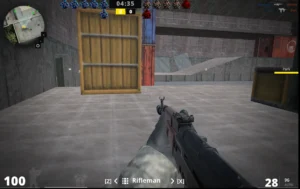
CS 1 is an FPS combat simulator influenced by competitive shooters such as Counter-Strike, Valorant and Standoff.
The game revolves around shooting skills, movement, tactical positioning and progressing through combat-focused scenarios. Yandex lists the game with an 18+ age rating, so it is intended for adult players.
How to Play
Move through the map while watching for opponents and using cover wherever possible.
Players should avoid standing still in exposed positions. Instead, move between safer areas, aim before opening fire and reload when there is enough time to do so safely.
Different weapons can be selected depending on the situation.
Controls
The Yandex listing provides detailed PC controls:
- WASD: Move
- Left Shift: Run
- Space: Jump
- C: Crouch
- Q / E: Lean
- Left Mouse Button: Shoot
- Right Mouse Button: Aim
- R: Reload
- 1–4: Change weapon
- Z / X: Change specialisation
- Tab: Score
- Esc: Menu
Mobile controls use virtual buttons and an on-screen joystick.
Recommended for: Adult FPS players who enjoy tactical shooters and competitive-style gunplay.
6. Command Strike FPS
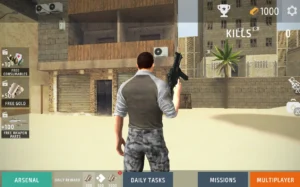
Play Command Strike FPS on Yandex Games
Command Strike FPS is one of the more substantial shooters in this selection.
Developed by Mirra Games, it includes different maps and combat modes involving missions, deathmatches and capturing flags. Players also have access to different weapons, grenades and health items.
How to Play
Begin by choosing the available mission or game mode.
Move through the map carefully and use cover rather than charging directly at groups of enemies. Aim before firing when fighting at longer distances and switch weapons when the current gun is unsuitable.
Grenades can be useful against grouped enemies, while first-aid kits can help keep a run going after taking damage.
Controls
- WASD: Move
- Left Mouse Button: Shoot
- Right Mouse Button: Aim
- Space: Jump
- G: Throw grenade
- H: Use first-aid kit
- C: Crouch
- Mouse Wheel / Number Keys: Change weapon
- Tab: Menu
Recommended for: FPS fans wanting missions, multiple weapons and objective-based combat.
7. Time Shooter 2
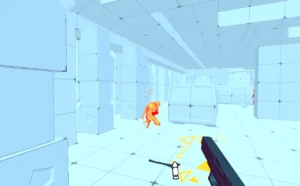
Play Time Shooter 2 on Yandex Games
Time Shooter 2 takes familiar first-person shooting mechanics and adds a clever time system.
Time progresses primarily when the player moves. Staying still therefore creates an opportunity to examine the environment, locate enemies and decide what to do next.
That makes the game partly a shooter and partly a tactical puzzle.
How to Play
At the beginning of an encounter, avoid immediately rushing forwards.
Look around and identify enemies, available weapons and possible cover. Plan the first movement before taking action.
Once the player moves, enemies and projectiles begin moving as well. Clear the enemies in the area and advance to the next encounter.
Objects and weapons can also be thrown when ammunition is unavailable or another tactical option is needed.
Controls
- WASD / Arrow Keys: Move
- Left Mouse Button: Shoot or pick up a weapon
- Right Mouse Button: Throw a weapon or object
Some versions also allow R for throwing.
Recommended for: Shooter fans who prefer strategy and problem-solving over constant fast movement.
8. Airport Simulator
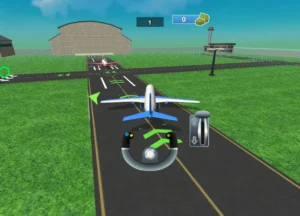
Play Airport Simulator on Yandex Games
Airport Simulator is one of the calmer choices in the Yandex Games selection.
The Yandex listing describes it as a casual simulator covering different airport processes and events before an aircraft takes off. It carries a 6+ age rating.
How to Play
Complete the airport activity presented at each stage.
Tasks can involve interacting with airport processes, vehicles or aircraft. New challenges are introduced as players progress, so following the visual prompts is important.
Completing operations earns rewards that can be used to unlock additional aircraft.
Players also need to be careful when controlling vehicles or aircraft, as hitting obstacles can interfere with completing the task.
Controls
Airport Simulator primarily uses simple pointer or touchscreen interaction:
- Mouse Click: Select or perform an action on desktop
- Tap: Perform actions on touchscreen devices
- On-Screen Controls: Used when controlling vehicles or aircraft
Yandex specifically states that most operations are completed by touching the screen.
Recommended for: Younger players, casual gamers and anyone interested in airports or simple simulation games.
9. Solar Smash
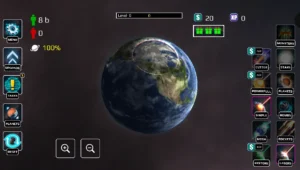
Play Solar Smash on Yandex Games
Solar Smash is a destruction sandbox built around planets rather than conventional levels.
Players select different cosmic weapons and see how each one affects the planet. Lasers, missiles and other destructive tools can produce very different results.
There is no requirement to achieve a traditional victory, making experimentation the main attraction.
How to Play
Choose a planet and select one of the available destruction tools.
Aim at an area on the planet and activate the weapon. Players can then rotate the planet to inspect the results from another angle.
Try different weapons separately before combining attacks to see how the physics and damage systems react.
The planet can be reset whenever the player wants to begin another experiment.
Controls
- Mouse: Aim and interact
- Left Click: Select and activate weapons
- Click + Drag: Rotate the planet
- Mouse Wheel: Zoom in or out on supported versions
- Tap / Drag: Equivalent controls on mobile
Recommended for: Space fans, sandbox players and anyone who enjoys destruction simulations.
10. Ultimate Flying Car

Play Ultimate Flying Car on Yandex Games
Ultimate Flying Car combines racing with the unusual ability to take vehicles into the air.
It includes both Race and Free Ride modes and can be played alone or with two players on the same computer.
Free Ride is useful for learning how the cars behave, while racing provides a more competitive challenge.
How to Play
Select one- or two-player mode and choose between Free Ride and Racing.
Accelerate through the environment and use ramps and other opportunities to become airborne.
Nitro can provide additional speed, while the handbrake helps when making sharper turns.
In Race mode, the objective is to reach the finish before the opposition. Free Ride instead allows players to explore and practise.
Controls
Player 1
- WASD: Drive
- Shift: Nitro
- T: Look backwards
- R: Reset/fix vehicle position
- Space: Handbrake
Player 2
- Arrow Keys: Drive
- M: Nitro
- L: Look backwards
- U: Reset position
- K: Handbrake
Recommended for: Racing fans, two-player gamers and players looking for an unusual driving game.
11. Ninja Obby Parkour
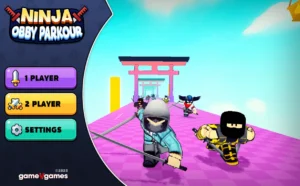
Play Ninja Obby Parkour on Yandex Games
Ninja Obby Parkour combines obstacle-course gameplay with ninja-style movement.
The aim is to reach the end of each course without falling from platforms or colliding with dangerous obstacles.
Checkpoints reduce the frustration of failed jumps because players can restart from later parts of the course rather than beginning everything again.
How to Play
Move carefully from platform to platform while watching the position and movement of upcoming obstacles.
Use jumps to cross gaps and a double jump when additional height or distance is required.
Players can collect coins while progressing and may use them for cosmetic customisation.
The game can also support two-player gameplay, making the course into a race between friends.
Controls
Player 1
- WASD: Move
- Space: Jump
- Double Space: Double jump
- Mouse: Look around
Player 2
- Arrow Keys: Move
- L: Jump
Recommended for: Obby fans, Roblox-style platforming players and local multiplayer sessions.
12. School Escape Obby Run
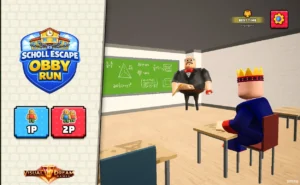
Play School Escape Obby Run on Yandex Games
School Escape Obby Run turns an ordinary school into a parkour course filled with traps and obstacles.
Yandex describes the objective simply: escape from the school as quickly as possible while avoiding traps and teachers, collecting rewards and finding a good route through each stage.
How to Play
Run through the school and inspect upcoming sections before committing to difficult jumps.
Avoid teachers and other hazards while looking for safe routes through each area.
The double-jump mechanic is particularly important because it allows players to cross larger gaps or correct a slightly mistimed first jump.
Tickets and money can also be collected while progressing.
Players can attempt the escape alone or use the two-player mode.
Controls
Player 1
- WASD: Move
- Space: Jump
- Press Space Twice: Double jump
- Left Shift: Run
Player 2
- Arrow Keys: Move
- L: Jump/double jump
- K: Run
Recommended for: Obby players, speedrunners and friends looking for a two-player platforming challenge.
13. Bike Rush
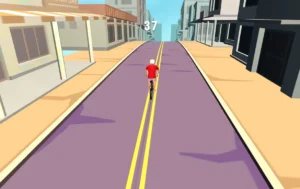
Play Bike Rush on Yandex Games
Bike Rush is a fast arcade cycling game where keeping the bike moving is only part of the challenge.
Players have to steer around obstacles, use speed boosters and hit ramps while trying to travel as far as possible without crashing.
Ramps can also be used for airborne tricks.
How to Play
Hold the control to begin cycling and guide the rider left or right along the road.
Avoid roadblocks and other hazards while aiming for useful speed-boost sections.
When approaching a ramp, maintain enough speed to launch into the air. Players can attempt flips while airborne, but pushing for unnecessary tricks can also increase the chance of crashing.
The run continues until the cyclist falls or hits an obstacle badly enough to end the attempt.
Controls
The browser version uses very simple mouse controls:
- Hold Left Mouse Button: Pedal and maintain movement
- Move Mouse Left/Right: Steer
- Keep Holding While Airborne: Attempt a flip
- Release Mouse Button: Slow down
Recommended for: Arcade racing fans, stunt-game players and anyone wanting simple one-handed controls.
14. Tropical Merge
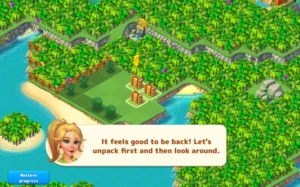
Play Tropical Merge on Yandex Games
Tropical Merge offers a much slower experience than most of the action games on this list.
Players develop a tropical island by merging matching objects into upgraded versions, completing quests and opening additional parts of the map.
The gameplay rewards organisation and forward planning rather than fast reactions.
How to Play
Look across the board for matching items.
Drag matching objects together to create an upgraded version. The resulting object can later be merged again as the player progresses through its upgrade chain.
Completing quests helps move the wider island progression forwards.
It can sometimes be useful to wait until several matching objects are available instead of immediately merging everything on the board.
Controls
Desktop controls are straightforward:
- Left Click + Drag: Move or merge an object
- Mouse Wheel: Zoom in or out
Touchscreen versions use the same basic principle with tapping and dragging.
Recommended for: Puzzle fans, casual players and gamers who enjoy relaxed progression systems.
15. Weapon Run Master
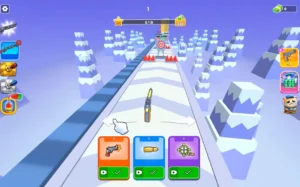
Play Weapon Run Master on Yandex Games
Weapon Run Master completes the Top 15 with a combination of runner gameplay and weapon progression.
The basic loop revolves around moving through a course, improving firepower and dealing with increasingly difficult obstacles or opponents.
The wider Weapon Run Master concept combines running, weapon merging and upgrades, making progression almost as important as reflexes.
How to Play
Start moving through the course and watch carefully for upgrade opportunities.
Collect useful weapons or resources and choose routes that improve the player’s firepower where possible.
More powerful equipment makes it easier to clear later obstacles and enemies.
Players should also watch the route ahead rather than concentrating entirely on collecting upgrades, as taking the wrong path can reduce the effectiveness of the run.
Controls
The game is designed around simple runner-style interaction. Depending on the Yandex browser build and device, movement is handled through the mouse, touch input or the on-screen controls displayed by the game.
Because the precise Yandex control layout was not available in the accessible game documentation, players should follow the controls displayed when that version loads rather than assuming a specific keyboard binding.
Recommended for: Runner-game fans, casual action players and anyone who enjoys collecting and upgrading equipment during a level.
What Does “Yandex Games Unblocked” Actually Mean?
The phrase can be slightly misleading.
Yandex Games is fundamentally a browser gaming platform. Yandex states that users can open its games through a supported browser without downloading each title as a conventional application.
That is different from guaranteeing that the website is “unblocked”.
A school, workplace, library or other organisation may restrict Yandex Games at network level. If that happens, the game cannot be considered unblocked on that particular network simply because it runs through HTML5 or a browser.
Players should therefore use the platform only where gaming websites are permitted.
Can Yandex Games Be Played Without Downloading Anything?
Generally, yes.
Yandex’s own support documentation says its online games are played through the browser and cannot normally be downloaded for offline play. An internet connection is therefore required for the browser versions to work correctly.
This makes the platform convenient on compatible:
- Desktop PCs
- Laptops
- Tablets
- Mobile phones
- Chromebooks with supported browsers
Performance still depends on the individual game, browser, device and internet connection.
Are Yandex Games Safe to Play?
Yandex says games are checked by moderators before being published in its catalogue, including checks relating to prohibited content and viruses. Games also display recommended age restrictions.
Players should still follow standard online safety precautions.
Avoid downloading files offered through suspicious advertisements, keep the browser and security software updated, and check age ratings before allowing younger children to play.
Yandex also recommends troubleshooting steps such as trying another browser, clearing cookies or cache and checking whether security software is preventing a game from loading. It specifically advises against disabling antivirus protection simply to make a game work.
Can Yandex Games Be Played at School?
It depends entirely on the school’s internet policy.
Some schools may allow Yandex Games, while others may block gaming websites through their firewall or filtering system.
Students should not attempt to bypass network controls using proxies, VPNs or other workarounds. If Yandex Games is restricted, the appropriate option is to play later using a permitted personal connection.
The same principle applies to workplace networks.
Why Are Yandex Browser Games Popular?
One of the biggest advantages is convenience.
Players do not normally need to install a large game client before starting. Instead, they can select a game from the catalogue and launch it through their browser.
Yandex also organises games into categories and provides popular, recommended and new-game sections to help users discover titles.
The catalogue covers a wide range of genres, making it possible to move from a racing game to a shooter or puzzle game without switching platforms.
For quick browser sessions, titles such as Basket Random and Temple Run are particularly accessible, while Melon Sandbox, Offroad Outlaws and Tropical Merge offer experiences better suited to players who want to spend longer with one game.
Which Yandex Game Should Players Try First?
The best choice depends on the type of gameplay they enjoy.
For fast arcade action, Temple Run and Bike Rush are strong starting points. Basket Random is a particularly good choice for two players, while Command Strike FPS and Time Shooter 2 are better suited to shooting-game fans.
Players interested in experimentation should look towards Melon Sandbox or Solar Smash. Those wanting something more relaxed may prefer Tropical Merge or Airport Simulator.
There is no single best Yandex game for everyone, which is one of the main strengths of such a varied browser catalogue.
Conclusion
Yandex Games unblocked offers a broad selection of browser-based entertainment when the Yandex Games platform is permitted on the player’s network.
From Temple Run and Bike Rush to Basket Random, Command Strike FPS, Melon Sandbox and Tropical Merge, the catalogue covers considerably more than simple arcade games.
The biggest advantage is accessibility: many games can be launched directly through a browser without a conventional installation.
However, “unblocked” should not be interpreted as a method for circumventing school or workplace restrictions.
Players should use Yandex Games only on networks where gaming is allowed and choose titles appropriate for their age and device.
FAQs About Yandex Games Unblocked
Are Yandex Games free?
Yandex describes its Games service as offering free online games across categories including action, puzzles, racing and multiplayer. Individual games may still contain advertising or optional in-game purchases.
Do Yandex Games need to be installed?
Browser versions generally do not need to be downloaded or installed. They are designed to launch online through a compatible browser.
Why is Yandex Games blocked on some networks?
Schools, employers and network administrators can restrict entertainment or gaming websites through their own filtering policies. Yandex cannot guarantee that its platform will be available on every network.
Which Yandex game is good for two players?
Basket Random is one of the strongest choices because it supports quick physics-based basketball matches and is designed around both solo and two-player gameplay.
Which Yandex Games are good for shooting fans?
Command Strike FPS, CS 1 and Time Shooter 2 are the main shooter-focused selections in this list, although their styles differ considerably.
Which Yandex game is best for casual players?
Tropical Merge, Basket Random and Airport Simulator are approachable choices for players who want something less demanding than a competitive shooter.
Can Yandex Games work on a Chromebook?
Browser-based Yandex games can potentially run on Chromebooks where the browser, hardware and network support them. Access still depends on any restrictions applied by the device administrator or network.