
GTA 6 Xbox auto upload bans have become a growing concern among Xbox Series X and Series S players following reports of temporary account suspensions linked to automatically uploaded gameplay clips from Grand Theft Auto VI.
Some players claim that ordinary gameplay recordings, including scenes featuring characters on Vice City’s beaches, have triggered Xbox content moderation systems.
One widely discussed case involved a player reporting a two-day suspension after a short video clip was uploaded to the Xbox Network without a separate manual sharing action.
The issue has attracted attention because GTA 6 contains mature content, while Xbox applies separate community standards to material uploaded through its online services.
However, these reports do not establish that Microsoft is banning everyone who records GTA 6.
The reported enforcement actions concern uploaded content, and the precise reasons for individual suspensions have not been independently confirmed.
Players who want to avoid unnecessary risks can disable automatic uploads while keeping their gameplay recordings saved locally.
Why Are GTA 6 Players Getting Banned on Xbox?
The GTA 6 Xbox ban controversy emerged shortly after the game’s release on 19 November 2026, when Xbox users began reporting temporary suspensions associated with gameplay screenshots and video recordings.
A Reddit user identified as sangobar reported receiving a two-day account suspension after capturing a 28-second clip while exploring Vice City’s coastal environment.
According to the player’s account, the recording showed non-player characters wearing ordinary beach clothing rather than explicit nudity. Nevertheless, the clip was reportedly blocked following its automatic upload to the Xbox Network.
The user believed that Xbox’s content detection system had incorrectly classified the footage as inappropriate.
The exact moderation decision has not been independently verified, and Microsoft has not publicly established that ordinary swimwear in GTA 6 is systematically triggering incorrect suspensions.
The distinction matters because a reported false positive is not the same as confirmation of a widespread moderation failure.
| GTA 6 Xbox Ban Details | Reported Information |
| Affected platform | Xbox Series X and Series S |
| Game | Grand Theft Auto VI |
| Reported issue | Gameplay captures uploaded to Xbox Network |
| Reported suspension | Approximately two days |
| Content involved | Beach scenes and potentially mature imagery |
| Suspected cause | Content moderation detecting inappropriate imagery |
| Confirmed widespread ban wave | No |
| Immediate precaution | Disable automatic uploads |
The controversy also highlights a wider problem with video game capture systems: gameplay content that is permitted inside an age-restricted game may not meet the rules of the platform where it is automatically uploaded.
Can You Get Banned for Recording GTA 6 Gameplay?
Simply recording GTA 6 gameplay is not, by itself, the issue described in the recent reports. The concern arises when a screenshot or video recording reaches the Xbox Network and is assessed against Microsoft’s content policies.
Xbox allows players to capture memorable gameplay moments, including vehicle chases, missions, unusual encounters and open-world exploration.
However, the network’s content rules apply separately from the game’s age classification.
Xbox Community Standards and Mature Content
Microsoft’s official Xbox Community Standards explain that mature material appearing within a game may not be suitable for sharing with the wider Xbox community.
The rules specifically prohibit distributing gameplay screenshots or clips containing mature sexual content.
Consequently, purchasing an age-restricted game does not automatically grant permission to upload every scene from that game to Xbox services.
The following distinction is important:
- Recording gameplay locally: Does not constitute an Xbox Network upload by itself.
- Automatically uploading gameplay: May expose captured material to Xbox content moderation.
- Manually sharing a clip: Remains subject to Xbox community standards.
- Keeping screenshots private on the console: Avoids the particular risk associated with uploading them to the Xbox Network.
Microsoft’s restrictions can affect access to online multiplayer, communication features, content sharing and other Xbox services, depending on the enforcement action.
The company has not published a GTA 6-specific rule stating that ordinary gameplay recording is prohibited.
How to Turn Off GTA 6 Auto Uploads on Xbox Series X and Series S?
Disabling automatic uploads is a straightforward precaution for players concerned about their gameplay recordings appearing on the Xbox Network.
The setting is controlled through the console rather than the GTA 6 gameplay menu.
Step 1: Open Xbox Settings
Press the Xbox button on your controller to open the guide.
Navigate to Profile & system, then select Settings.
Step 2: Find Capture & Share
Within the Settings menu:
- Select Preferences.
- Open Capture & share.
- Locate Automatically upload.
- Review the currently selected upload option.
Step 3: Disable Automatic Uploads
Change the Automatically upload setting to Don’t upload.
Your console should now stop automatically transferring new gameplay captures to the Xbox Network through that setting.
The process is the same general procedure for Xbox Series X and Xbox Series S, although menu wording can change with console updates.
Will Turning Off Auto Upload Stop Game Recording?
No. Disabling automatic uploading does not automatically disable gameplay capture.
You can continue recording supported gameplay moments and saving screenshots, provided game capture remains enabled and suitable local storage is available.
The important difference is where the recording goes after it has been captured.
Players who regularly record gameplay should check their capture save location and available storage capacity.
Xbox also provides ways to manage saved captures and transfer selected recordings elsewhere.
For gamers who want to understand other console-level changes, our guide to the Xbox Series X and S updates covers additional system features and settings.
Why Can GTA 6 Gameplay Trigger Xbox Content Moderation?
Grand Theft Auto VI features an adult-oriented open world containing crime, violence, strong language and sexual themes.
These elements are part of the game’s intended experience, but Xbox’s online content policies apply independently of Rockstar’s creative decisions.
Microsoft uses a combination of automated technology and human moderation in its wider safety processes.
That does not prove an automated classifier made the decisions described in the latest GTA 6 complaints.
The Difference Between Game Ratings and Network Rules
A game’s age rating describes its suitability for particular audiences. It does not override the content rules of every service on which its footage might be shared.
For example, an adult player may be permitted to explore mature environments within GTA 6, but sharing explicit imagery through a network accessible to a wider audience may still violate platform rules.
This difference is particularly relevant for open-world titles because players cannot always predict what will appear in the background of a recording.
A routine driving sequence could unexpectedly include mature imagery, while a clip intended to demonstrate a mission or humorous encounter might capture unrelated background activity.
Craig Reid, a staff writer at Pure Xbox, highlighted the uncertainty surrounding the reports and advised concerned players to consider turning off automatic uploading.
That advice reflects a practical distinction: reducing unnecessary uploads is more reliable than assuming every gameplay scene will satisfy network moderation rules.
Has This Xbox Auto Upload Ban Problem Happened Before?
Yes. Xbox previously faced similar criticism involving Baldur’s Gate 3 in January 2024.
Players reported receiving account suspensions after clips containing explicit scenes from the role-playing game were uploaded to Xbox services.
The situation became controversial because the recorded material originated from a game legitimately available on Microsoft’s console.
Michael Douse, director of publishing at Larian Studios, publicly addressed the complaints and confirmed that the studio was discussing the issue with Microsoft.
He described the situation as “annoying and uncool.”
That statement was made about Baldur’s Gate 3 in 2024, not the current GTA 6 reports.
Microsoft subsequently explained that the Baldur’s Gate 3 enforcement decisions were subject to moderation review and that certain suspensions could be reversed.
The historical case demonstrates that mature gameplay recordings and Xbox’s online content rules have conflicted before.
However, it does not establish that the current GTA 6 complaints have the same technical cause or will receive the same resolution.
What Happens If You Receive a GTA 6 Xbox Suspension?
Players who receive an Xbox enforcement notice should first identify the precise restriction placed on their account.
Not every suspension prevents access to the entire console or every purchased game.
Xbox can impose different restrictions depending on the nature and severity of a policy violation.
| Enforcement Action | Possible Effect |
| Content removal | Uploaded screenshot or video is removed |
| Capture-sharing restriction | Player cannot upload certain new content |
| Communication suspension | Messaging, party or voice functions may be restricted |
| Multiplayer restriction | Access to some online gaming features may be affected |
| Account suspension | Wider Xbox services may become temporarily unavailable |
| Permanent suspension | More serious account or device access consequences |
Rockstar’s support guidance also distinguishes Xbox account enforcement from restrictions imposed directly through Rockstar Games’ own online services.
An Xbox enforcement notice should therefore not automatically be interpreted as a Rockstar account ban.
Players who encounter connection difficulties without an enforcement notice may instead need to investigate ordinary network or account problems.
Our guide to fixing the Xbox ‘For This Game You Need to Be Online’ error explains those separate issues.
How to Check and Appeal an Xbox Suspension?
If your Xbox account has been restricted:
- Sign in to Xbox Support using the affected Microsoft account.
- Open your enforcement history.
- Review the reason, restriction type and expiration date.
- Check whether a case review option is available.
- Submit an appeal if the enforcement action is eligible.
Microsoft provides an official guide to submitting an Xbox case review.
Not every suspension qualifies for appeal. Some short-duration enforcement actions may be ineligible, and the availability of a review depends on Microsoft’s eligibility rules.
If a review option is unavailable, players should not assume that repeatedly contacting unrelated support departments will automatically overturn the decision.
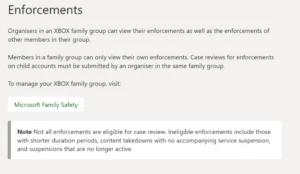
Where Xbox players can check account suspensions and available appeal options.
Should GTA 6 Players Delete Previously Uploaded Clips?
Turning off automatic uploads changes how future gameplay captures are handled. It does not necessarily remove screenshots or recordings already stored on the Xbox Network.
Players concerned about previous GTA 6 recordings should separately review their existing captures.
Open the Xbox capture management area and inspect the recordings stored on the network.
Pay particular attention to clips that contain mature imagery or scenes you did not intend to share online.
Where necessary, delete selected captures from the Xbox Network.
Be careful to distinguish between deleting a network copy and deleting a recording saved locally on the console.
Players who want to preserve particular clips should check their backup options before deleting any copies.
Removing a previously uploaded recording is not a guarantee that an enforcement action already issued against the account will be reversed.
Are OneDrive Uploads Safer Than Xbox Network Uploads?
Xbox also supports backing up gameplay recordings to OneDrive.
A personal OneDrive backup is different from uploading a capture to the Xbox Network for community sharing.
For players who want to keep a private archive of GTA 6 footage, a personal backup can provide a useful alternative to automatic Xbox Network uploads.
However, players should still review their OneDrive sharing permissions and comply with the rules governing any service where they later distribute the footage.
A private backup should not be confused with unrestricted permission to publish explicit content.
What Should Xbox Players Do Before Sharing GTA 6 Clips?
The most practical approach is to separate recording from distribution.
Players can continue enjoying GTA 6 and preserving memorable moments without automatically placing every screenshot or video onto the Xbox Network.
Before sharing gameplay footage, consider the following precautions:
- Disable automatic uploads if you do not need them.
- Review clips for potentially restricted content before manually sharing.
- Keep personal gameplay recordings saved locally when appropriate.
- Use suitable private backups for clips you want to retain.
- Check existing uploads and remove content that could breach platform rules.
- Review any Xbox enforcement notice before assuming the restriction is related to GTA 6.
For UK players enjoying Rockstar’s latest release, these precautions are especially useful because GTA 6 combines realistic environments with unpredictable open-world encounters.
Players interested in the game’s editions and launch rewards can also explore our GTA 6 pre-order bonus guide.
The game’s prominence across the console market also makes the controversy significant for Xbox.
Our coverage of the most-played PlayStation and Xbox games provides wider context on the competition for player attention.
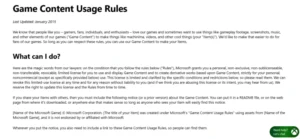
Microsoft’s content-sharing rules apply to gameplay clips uploaded to Xbox services.
Conclusion
The GTA 6 Xbox auto upload ban reports highlight an important difference between recording gameplay and sharing it through Microsoft’s online services.
Although some players have reported two-day suspensions following automatically uploaded GTA 6 clips, the evidence does not establish a widespread ban on ordinary gameplay recording.
Xbox’s existing community standards can restrict mature content shared through its network, regardless of whether that material appears in an officially released game.
For concerned players, disabling automatic uploads, reviewing existing captures and understanding the enforcement process are sensible precautions.
Until Microsoft provides more specific clarification, managing gameplay recordings carefully remains the most practical approach.
Frequently Asked Questions
Can GTA 6 get you banned on Xbox?
Some players have reported temporary Xbox suspensions after gameplay clips were uploaded to the network. This does not mean simply playing GTA 6 or recording gameplay automatically results in a ban.
How do I stop GTA 6 clips from automatically uploading?
Open Settings → Preferences → Capture & share → Automatically upload, then select Don’t upload. This prevents new captures from being automatically uploaded through that setting.
Are GTA 6 Xbox bans permanent?
The recent reports primarily describe temporary suspensions, including two-day restrictions. Xbox can impose more serious penalties for other violations, but permanent GTA 6 capture bans have not been established by these reports.
Can I appeal a two-day Xbox suspension?
Some short-duration suspensions are not eligible for appeal. Check your Xbox enforcement history to see whether Microsoft offers a case review for your particular restriction.
Can I still save GTA 6 clips after disabling auto upload?
Yes. You can continue saving supported gameplay captures locally, provided recording remains enabled. Disabling automatic network uploading does not automatically disable local recording.
Is Rockstar Games banning players for GTA 6 screenshots?
The current controversy concerns Xbox Network enforcement rather than a confirmed Rockstar Games ban policy for screenshots. Rockstar’s own online-service bans operate separately from Xbox account restrictions.
Does turning off Xbox auto upload delete old GTA 6 clips?
No. Disabling automatic uploads does not necessarily delete clips already stored on the Xbox Network. Previously uploaded recordings must be reviewed and managed separately.