
World of Warcraft: Forever (WoW Forever) is a new MMORPG experience developed by Blizzard Entertainment, built around the original world of Azeroth with new locations, playable character combinations, quests, dungeons and progression systems.
Scheduled to launch globally on 4 November 2026, WoW Forever takes players back to a reimagined version of the original World of Warcraft, with a permanent level cap of 60.
Rather than regularly increasing the maximum level through conventional expansions, the game is designed to develop through new content, horizontal progression and continuing updates.
If you are wondering how to play WoW Forever, the process begins by installing Battle.net, selecting the correct game version, choosing your experience preset and ruleset, and creating a character.
Once inside Azeroth, you can complete quests, explore different regions, develop your abilities and join other players in dungeons, raids or PvP battles.
This guide explains how to install and play WoW Forever, including its ruleset variations, starting locations, character classes, multiplayer activities and practical strategies for new players.
What Is World of Warcraft: Forever?
World of Warcraft: Forever is a standalone MMORPG experience within the wider Warcraft ecosystem, available alongside modern World of Warcraft and WoW Classic.
The story is set after the events of Warcraft III Reforged: Forsaken Kingdom and before the original Molten Core storyline.
Players begin their adventures across the familiar continents of the Eastern Kingdoms and Kalimdor, but the environment includes expanded regions, previously unexplored locations and new adventures.
The most important design difference is the emphasis on long-term world progression rather than continually raising the level cap.
Characters progress towards level 60, but the game continues expanding through:
- New quests and storylines
- Additional dungeons
- Raids and battlegrounds
- Revised class abilities
- New playable race-and-class combinations
- Legacy account progression
- Profession and crafting improvements
- Exploration rewards
- Community activities
Blizzard executive producer Holly Longdale described the philosophy behind the experience with the words:
“There’s no rush here. It’s the journey that counts.”
That approach makes exploration, cooperation and character development important throughout the game rather than treating the early levels as something players should rush through.
| Game detail | Information |
| Full title | World of Warcraft: Forever |
| Developer and publisher | Blizzard Entertainment |
| Global launch | 4 November 2026 |
| UK launch time | 11:00 pm GMT |
| Platforms | Windows and macOS |
| Genre | Massively Multiplayer Online Role-Playing Game (MMORPG) |
| Maximum character level | 60 |
| Access | Active WoW subscription or Game Time |
| Playable factions | Alliance and Horde |
| Experience presets | Classic and Enhanced |
| Launch rulesets | Normal, PvP, Roleplay, Roleplay-PvP |
| Hardcore | Planned after launch |
| New quests | More than 1,000 |
| New five-player dungeons | Nine |
| New playable race | Skyborne, with a qualifying paid upgrade |
| Controller support | Available in beta |
How Do You Download and Install WoW Forever?
WoW Forever is accessed through the Battle.net desktop application.
The game is available on Windows and macOS. You need a Battle.net account and, under normal circumstances, an active World of Warcraft subscription or Game Time.
Step 1: Create a Battle.net Account
Visit Battle.net and create an account if you do not already have one.
You will need to:
- Provide the required account information.
- Create a secure password.
- Verify your email address.
- Enable additional account security where available.
- Sign in to Battle.net.
Players who already use Battle.net for other Blizzard games can generally use their existing account.
Step 2: Activate Your WoW Subscription
WoW Forever is included with an active World of Warcraft subscription or Game Time.
You do not need to purchase an optional expansion-style upgrade simply to access the base Forever experience.
However, selected premium content requires an additional purchase.
| Access option | What it provides |
| Active WoW subscription | Access to the base game |
| Active Game Time | Access for the remaining Game Time period |
| Skyborne Heroic Pack | Skyborne race and starting experience, plus additional benefits |
| Skyborne Epic Pack | Heroic benefits, additional rewards and included Game Time |
| Warcraft Forever Collection | Combined Warcraft benefits and premium extras |
| Eligible launch-week invitation code | Temporary access during the specified invitation period |
The optional Skyborne packs are therefore not mandatory for ordinary character creation.
Step 3: Install the Battle.net Desktop App
Download and install the official Battle.net desktop application.
After installation:
- Launch Battle.net.
- Sign in to your account.
- Open the World of Warcraft game section.
- Locate the Game Version menu.
- Select World of Warcraft: Forever.
- Choose the correct WoW account if you have multiple accounts.
- Click Install.
Make sure your device has sufficient free storage and meets the current system requirements.
The installation size shown in Battle.net should take priority over unofficial download-size estimates.
Step 4: Download the Game Files
Battle.net will download the required game files.
Installation time depends on:
- Internet connection speed
- Storage performance
- Available disk space
- Server demand
- Existing Blizzard game files
- Required launcher updates
Avoid interrupting the installation unless necessary.
When the download is complete and the servers are available, click Play.
Step 5: Launch WoW Forever
Once the game starts, you can choose your preferred interface experience and ruleset before creating your character.
The official new-player setup and starter instructions provide additional guidance for account preparation, installation and character creation.
What Are the Different Variations in WoW Forever?
WoW Forever allows players to customise their experience through two different systems:
- Experience presets, which affect presentation and interface options.
- Rulesets, which determine PvP conditions and the type of player community.
These are separate choices.
Changing interface settings does not change the rules governing combat between players.
Classic and Enhanced Experience Presets
The first time you enter the game, you choose between Classic and Enhanced.
| Feature | Classic preset | Enhanced preset |
| Character models | Standard Definition | High Definition |
| Quest map guidance | Reduced | Enabled |
| One-bag interface | Disabled initially | Enabled |
| Transmog | Disabled initially | Enabled |
| Camera/movement defaults | Traditional-style bindings | Modern strafe bindings |
| Interface layout | Classic-style | Centred modern layout |
| General experience | More manual exploration | Greater convenience |
The Classic preset recreates a more traditional interface with fewer automatic navigation aids.
The Enhanced preset provides clearer quest markers, modern interface features and higher-detail character models.
For someone who has never played World of Warcraft, Enhanced is usually the easier starting point.
Importantly, these presets are not permanent restrictions. Players can change individual settings later through the Options menu.
Which WoW Forever Ruleset Should You Choose?
Rulesets determine the type of multiplayer environment you enter.
Instead of choosing from a traditional list of individual realms, WoW Forever uses broader ruleset-based player communities.
| Ruleset | Main gameplay experience | Suitable for |
| Normal (PvE) | Questing, exploration and optional PvP | Beginners and cooperative players |
| PvP | Frequent open-world faction combat | Competitive players |
| Roleplay (RP) | Character immersion and roleplay conventions | Story-focused players |
| Roleplay-PvP | Roleplaying with open-world faction conflict | Experienced RP/PvP players |
| Hardcore | High-stakes survival with permanent consequences for death | Experienced players; coming later |
Normal and PvP Gameplay
Normal is generally the most approachable ruleset for a new player.
You can focus on learning your character, exploring the world and completing quests without constantly facing unwanted combat against the opposing faction.
PvP introduces greater danger.
When travelling through contested territory, enemy players may attack, making positioning, preparation and cooperation more important.
Roleplay and Roleplay-PvP
Roleplay communities place additional emphasis on behaving consistently with the fantasy setting.
Players may create character backgrounds, interact in character and participate in community-organised events.
Roleplay-PvP combines those conventions with the danger of player combat.
Hardcore Survival
Hardcore is planned for release after the main launch.
Its central feature is that death ends the character’s Hardcore adventure.
Under the announced rules, a dead Hardcore character may be transferred to another ruleset, but it cannot simply continue playing within the Hardcore environment.
Players new to WoW Forever should generally learn the basic combat and exploration systems before attempting Hardcore.
How Do You Play WoW Forever Step by Step?
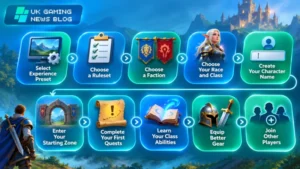
Once the game is installed, you can begin your adventure by following these steps.
Step 1: Select Your Experience Preset
On your first login, choose Classic or Enhanced.
For easier navigation, select Enhanced.
You can adjust the interface later as you become more comfortable with the game.
Step 2: Choose a Ruleset
Select Normal, PvP, Roleplay or Roleplay-PvP.
If you plan to play with friends, agree on your ruleset before creating characters.
Characters in different rulesets cannot normally join the same group for questing, dungeons or raids.
Step 3: Choose Your Faction
Select either:
- Alliance
- Horde
Your faction influences the cities, communities, storylines and other players you can cooperate with.
Alliance and Horde players cannot ordinarily form the same adventuring group.
This makes faction choice particularly important for multiplayer groups.
Step 4: Choose Your Race and Class
Your race determines your character’s appearance, racial abilities and starting location.
Your class determines your main gameplay abilities and combat role.
Some classes are designed primarily for dealing damage, while others can protect teammates or restore health.
WoW Forever also introduces new race-and-class combinations, including:
- Undead Paladin
- Dwarf Shaman
- Orc Mage
- Troll Warlock
- Human Hunter
- Gnome Priest
The new Skyborne race offers additional character choices but requires a qualifying upgrade.
Step 5: Create Your Character Name
WoW Forever uses a two-part naming system.
Instead of relying on a single name attached to a traditional realm, each character has two name components forming a unique identity within the region.
Choose a name that suits your preferred character style.
Names must comply with the game’s naming requirements, especially on Roleplay rulesets.
Step 6: Enter Your Starting Zone
After character creation, your adventure begins in the relevant starting area.
Look for non-player characters displaying an exclamation mark.
These characters offer quests.
Accept a quest and review the objectives in your Quest Log.
Starting quests normally introduce basic gameplay such as movement, combat, collecting items and speaking to other characters.
Step 7: Complete Your First Quests
Follow the quest instructions and locate the required objectives.
Early quests may involve:
- Defeating specific enemies.
- Collecting items.
- Speaking to NPCs.
- Exploring nearby locations.
- Delivering objects.
- Learning a new gameplay mechanic.
Completing quests provides experience and may award equipment, money or useful items.
Step 8: Learn Your Class Abilities
As your character develops, you gain access to abilities suited to your class.
Read their tooltips before adding them to your action bars.
Start by understanding:
- Your main attack
- Defensive abilities
- Resource management
- Healing options, where available
- Crowd-control abilities
- Class-specific utility
Do not attempt to memorise every advanced ability immediately.
Understanding a small number of useful actions is more effective than filling your interface with spells you cannot use confidently.
Step 9: Equip Better Gear
Enemies, quests and dungeons can provide equipment.
Better gear can improve your character’s effectiveness, but not every item with a higher level is automatically the best choice.
Some equipment offers statistics that are more valuable for particular classes or specialisations.
As you progress, pay attention to the statistics that improve your main combat role.
Step 10: Join Other Players
Once you understand the basic gameplay, consider joining other adventurers.
You can participate in:
- Cooperative questing
- Guild activities
- Five-player dungeons
- PvP battles
- Professions and crafting
- World exploration
- Social events
- Raids at higher levels
The social aspect is central to WoW Forever, especially because the game encourages players to cooperate during challenging content rather than relying entirely on automated convenience features.
What Are the Basic Controls in WoW Forever?
WoW Forever supports traditional keyboard-and-mouse gameplay, with gamepad support also available in beta.
The controls below describe common default WoW actions. Individual bindings can be changed.
| Action | Common keyboard control |
| Move forward | W |
| Move backwards | S |
| Turn or strafe | A / D, depending on preset |
| Jump | Space |
| Open map | M |
| Open bags | B |
| Open character panel | C |
| Open Quest Log | L |
| Open spellbook | P |
| Target nearest enemy | Tab |
| Use action-bar abilities | Number keys |
| Open game menu | Esc |
Mouse controls are useful for selecting enemies, interacting with objects and controlling the camera.
Players should adjust key bindings to suit their class and preferred playstyle.
Can You Play WoW Forever With a Controller?
Yes. Blizzard has introduced native gamepad support for WoW Forever.
The functionality covers targeting, combat actions, looting and navigating many interface elements.
To enable it:
- Open the game.
- Press Esc.
- Select Options.
- Open Gamepad under Gameplay.
- Enable or configure gamepad controls.
- Adjust targeting, action bars and camera settings.
The game supports XInput-compatible controllers and displays Xbox and PlayStation button indicators.
However, gamepad functionality remains in a functional beta state.
A keyboard is still needed for certain activities, particularly typing messages in chat.
Therefore, controller support should not yet be described as a completely keyboard-free experience.
What Can Players Do in the WoW Forever World?
WoW Forever expands the original Azeroth experience with new and reimagined regions.
Four prominent locations include:
| Zone | Main attraction |
| Zephras Isle | Skyborne starting experience, levels 1–12 |
| Riverglades | Frontier exploration and more than 150 new quests |
| Mount Hyjal | New adventures connected with Hyjal’s recovery |
| Shen’dralas | Mysteries involving the Shen’dralar and nearby territories |
The new regions are designed to complement the existing continents rather than replace them.
Exploration and Level Progression
The maximum level remains 60.
However, reaching level 60 is not intended to make the rest of the game irrelevant.
Players can continue exploring, collecting rewards, developing professions and participating in new activities through later content updates.
For beginners, the most effective approach is to complete nearby quests, gradually expand into new areas and avoid travelling into regions far beyond their current level.
How Does Multiplayer Work in WoW Forever?
WoW Forever supports several different player activities, each with different group sizes and objectives.
| Activity | Typical players | Main objective |
| Solo quests | 1 | Explore, level and complete objectives |
| Cooperative questing | Small groups | Complete difficult objectives together |
| Dungeons | 5 | Defeat enemies and dungeon bosses |
| Barrow Deeps raid | 10 | Coordinate advanced group encounters |
| Hyjal Summit raid | 20 | Complete large-scale raid encounters |
| Darkspear Islands battleground | 15 vs 15 | Fight for objectives and faction victory |
| Guilds | Variable | Build a continuing player community |
How Dungeon Groups Work?
Five-player dungeons introduce coordinated team combat.
A typical group uses three main combat roles:
- Tank: Protects the party by controlling dangerous enemies.
- Healer: Restores health and supports teammates.
- Damage dealers: Defeat enemies while avoiding unnecessary damage.
WoW Forever adds nine five-player dungeons across levels 13–60.
These include locations such as the Hall of Thanes, Ruins of Lordaeron, City of Dalaran, Blackmaw Hold and Alcaz Prison.
Dungeon success depends on understanding enemy abilities, controlling dangerous encounters and working with the other players.
When Do Raids Become Available?
The first major raids are scheduled to unlock on 9 December 2026.
Announced raid content includes:
- Barrow Deeps
- Hyjal Summit
- Onyxia’s Lair
Players should use the early weeks to level, improve equipment, develop professions and join a suitable guild before attempting organised raid progression.
What Is the Legacy Progression System?
One of WoW Forever’s most distinctive features is its Legacy System.
Instead of focusing entirely on increasing character power, Legacy introduces account-wide progression linked to different achievements and experiences.
Players can earn Legacy Points through activities such as completing challenges, exploring the world and developing characters.
The system includes:
- Legacy Challenges
- Legacy Perks
- Legacy Rewards
Legacy Perks are organised into progression trees, including areas connected with exploration, professions and resourcefulness.
Importantly, players do not have to create numerous alternate characters to benefit from every character advantage.
A single character can unlock the available advantages, although creating alternatives offers additional ways to explore the game.
This system also supports the wider trend towards persistent game worlds that reward long-term player engagement. The relationship between long-running multiplayer games and player-retention systems provides useful context for why persistent progression matters.
How Does the Camping System Work?
Camping is another new multiplayer feature designed to encourage interaction between players.
It expands the familiar Basic Campfire into a shared campsite.
Players can create campfires in outdoor areas and contribute profession-crafted features that provide useful bonuses.
The basic process is:
- Find a suitable outdoor location.
- Create a Basic Campfire.
- Invite nearby adventurers to join.
- Add eligible profession-crafted Camp Features.
- Sit or craft at the campsite for at least one minute.
- Receive benefits from the available features.
A campsite can support up to three contributed Camp Features, with each player contributing one.
The bonuses depend on the features installed and may overlap with certain class-related buffs rather than stacking with everything.
Camping is therefore both a practical system and a way to encourage social interaction while travelling through Azeroth.
What Are the Best Beginner Strategies for WoW Forever?

A few practical habits can make early progression easier.
1. Start With Normal Ruleset
Normal allows you to concentrate on learning the combat and exploration systems before encountering constant faction conflict.
2. Choose Enhanced Interface
Quest guidance and clearer interface controls can reduce confusion when learning a large open-world MMORPG.
3. Fight Enemies Individually
Combat is designed to be more deliberate than in many modern action RPGs.
Avoid attracting several enemies at once before understanding your defensive abilities and resources.
4. Keep Your Equipment Repaired
Damaged gear becomes less effective.
Visit appropriate vendors to repair equipment regularly, particularly after repeated deaths.
5. Use Your Hearthstone
Set your Hearthstone at a useful inn to return to an established location.
This can reduce unnecessary travel time.
6. Learn Flight Paths
Speak to flight masters when visiting new settlements.
Unlocked flight routes make travelling between discovered areas easier.
7. Save Gold for Useful Upgrades
Avoid spending all your early money on unnecessary purchases.
Training, equipment repairs, bags and other practical improvements may be more valuable.
8. Join a Guild
A guild can provide experienced players, dungeon partners and advice.
This can make difficult quests and group activities much easier to approach.
9. Experiment With Professions
Gathering and crafting can provide useful equipment, consumables and alternative progression opportunities.
10. Avoid Rushing to Level 60
The game’s progression structure rewards exploration and social experiences throughout the levelling journey.
Game director Ion Hazzikostas has described Forever as “a third pillar alongside Retail and Classic”, emphasising that it is a distinct long-term experience rather than simply another seasonal mode.
How Do You Survive When Your Character Dies?
Death works differently depending on your ruleset.
In normal gameplay, death does not permanently remove your character.
After dying:
- Release your spirit.
- Appear at a nearby graveyard.
- Follow the corpse marker.
- Return near your body.
- Select the resurrection option.
- Continue your adventure.
Alternatively, a Spirit Healer can resurrect you at the graveyard, although this option can cause equipment damage and temporary Resurrection Sickness.
Hardcore will use much stricter consequences when it becomes available.
The safest approach is to monitor health, manage resources and avoid dangerous encounters when underprepared.
What Happens After Reaching Level 60?
Level 60 is the maximum level, but it is not the end of progression.
Players can continue through:
- Raid progression
- Dungeon content
- PvP activities
- Equipment collection
- Legacy Challenges
- Profession development
- Guild events
- Cosmetic rewards
- Exploration
- New story content
Blizzard has also confirmed that later updates will introduce additional challenges, systems and regions.
The intention is to keep the original Azeroth setting relevant without repeatedly increasing the level cap.
How Is WoW Forever Different From WoW Classic?
Although both games are based on the original Azeroth era, their design approaches differ.
| Feature | WoW Classic | WoW Forever |
| Main concept | Revisit earlier Warcraft experiences | Expand a reimagined original Azeroth |
| Level progression | Depends on Classic version | Permanent level 60 cap |
| World content | Historical content progression | New zones and quests |
| Character options | Historical race/class restrictions | Expanded combinations |
| Interface | Traditional Classic presentation | Classic and Enhanced presets |
| Server selection | Traditional realm systems | Ruleset-based ecosystems |
| Legacy progression | Not the same system | New account-wide Legacy System |
| Controller features | Different support arrangements | Native beta gamepad support |
| Future development | Classic-specific progression | Continuing new content at level 60 |
WoW Forever is therefore more than a graphical update.
It retains familiar Warcraft foundations while introducing new systems designed specifically for its permanent game world.
What Should You Do if WoW Forever Is Not Working?
Technical problems can occur during installation or at launch.
Game Version Not Showing
Check that Battle.net is updated and that you have selected the World of Warcraft section.
Open the Game Version selector and look for WoW Forever.
Installation Fails
Check:
- Available disk space
- Internet connection
- Operating system compatibility
- Graphics driver version
- Battle.net updates
- Security software restrictions
Cannot Join Friends
Confirm that everyone selected the same ruleset and faction.
Players using different rulesets cannot normally form the same adventuring group.
Character Creation Problems
Check whether the selected name is already taken or violates naming rules.
Remember that the two-part character name must be unique within the region.
Controller Not Responding
Open the Gamepad settings, verify that the controller is recognised and configure the controls.
Remember that controller support remains in beta, so some functions still require a keyboard.
Server or Login Problems
During launch periods, high demand may affect connection and login availability.
Check official server information rather than assuming reinstalling the game will resolve every connection issue.
Conclusion
Learning how to play WoW Forever begins with installing Battle.net, activating your World of Warcraft access and choosing the correct game version.
New players should start with the Enhanced interface and Normal ruleset before creating a character, completing quests and exploring Azeroth.
As your character progresses towards level 60, you can participate in dungeons, professions, PvP, guild activities and the account-wide Legacy System.
Unlike conventional expansion-focused progression, WoW Forever is designed around a continually developing original Azeroth.
Taking time to understand your class, cooperate with others and explore new regions will make the experience more rewarding.
FAQs About How to Play WoW Forever
How do you start playing WoW Forever?
Install Battle.net, sign in, activate a WoW subscription or Game Time, select WoW Forever from the game versions and create a character. Choose your experience preset and ruleset before entering Azeroth.
Is WoW Forever free to play?
WoW Forever is included with an active World of Warcraft subscription or Game Time. Optional upgrade packages unlock additional benefits, including access to the Skyborne race.
Can beginners play WoW Forever?
Yes. Beginners can start with the Enhanced interface and Normal ruleset to learn questing, movement, combat and character progression without constant open-world PvP.
What is the maximum level in WoW Forever?
The level cap is 60. New content, Legacy progression, dungeons, raids and other systems provide continuing activities without raising the maximum character level.
Can you play WoW Forever alone?
Yes. Many quests and exploration activities can be completed solo. However, dungeons, raids and certain challenging objectives are designed for cooperative multiplayer.
How many players can play WoW Forever together?
Five-player dungeon groups are available, while announced raids include 10-player and 20-player encounters. A new battleground supports 15 players per faction.
Can you use a controller in WoW Forever?
Yes. Native gamepad support is available in beta for targeting, combat, looting and menus. Some activities, particularly text chat, still require keyboard input.
What is the Skyborne race in WoW Forever?
Skyborne is a new playable race beginning on Zephras Isle. It has faction-specific character choices and requires a qualifying Heroic Pack or higher upgrade.
Is Hardcore available at launch?
No. Hardcore is scheduled for a later update. Its rules will make death permanently end the character’s Hardcore journey, with transfer options to other rulesets.
Is WoW Forever the same as WoW Classic?
No. WoW Forever is a separate experience inspired by original Azeroth, featuring new content, expanded character choices, Legacy progression and a permanent level 60 cap.