Flash games unblocked remain popular among players who enjoy classic browser gaming, simple controls, challenging levels and quick entertainment without downloading large applications.
Although Adobe Flash Player was discontinued in 2020, many famous Flash games are still accessible through HTML5 versions, browser-based emulators and preserved gaming collections.
From platform adventures and puzzle challenges to tower defence, racing and restaurant management, these games offer different experiences for casual and experienced players.
Popular titles such as Run 3, Fireboy and Watergirl, Bloons Tower Defence 5 and Papa’s Pizzeria have remained recognisable long after the original Flash era.
Below are 10 of the best Flash games unblocked to explore in 2026, including their gameplay mechanics, rules, objectives and recommended player types.
What Are Flash Games Unblocked?
Flash games unblocked are classic browser games originally developed using Adobe Flash technology that can now be played through compatible websites, modern remakes or Flash emulation software.
The term unblocked generally describes browser games that are accessible without requiring a traditional game installation. However, it does not guarantee that a particular website will be available on every school, college or workplace network.
Flash games became particularly popular during the 2000s and early 2010s because they offered free, lightweight entertainment that could run inside ordinary web browsers.
Their common characteristics include:
- Simple controls: Most games require only a keyboard or mouse.
- Quick gameplay: Many levels can be completed in a few minutes.
- Different genres: Puzzle, action, arcade, strategy and sports games are widely represented.
- Low hardware requirements: Many classic titles can run on relatively modest computers.
- Replayability: High scores, increasingly difficult levels and unlockable upgrades encourage repeated attempts.
- Browser accessibility: Compatible versions can run without installing the discontinued Flash Player.
Modern alternatives such as Ruffle allow many original Flash games to function in current browsers, although compatibility varies between titles.
Top 10 Best Flash Games Unblocked
These selections cover different gaming genres rather than concentrating exclusively on platform games or arcade challenges.
| Game | Genre | Main Challenge |
| Fireboy and Watergirl | Puzzle/Platform | Co-operative problem-solving |
| Run 3 | Endless Runner | Precision movement |
| Bloons TD 5 | Tower Defence | Strategic tower placement |
| Papa’s Pizzeria | Simulation | Time and order management |
| Bloxorz | Logic/Puzzle | Spatial reasoning |
| Duck Life | Racing/Simulation | Training and progression |
| The World’s Hardest Game | Arcade/Puzzle | Timing and accuracy |
| Fancy Pants Adventures | Action/Platform | Movement and exploration |
| Learn to Fly 2 | Physics/Arcade | Upgrades and flight distance |
| Riddle School | Point-and-Click | Clue finding and logical thinking |
1. Fireboy and Watergirl
How to Play:
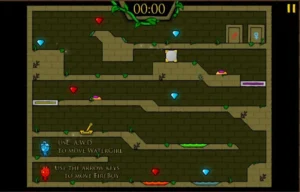
Fireboy and Watergirl is a co-operative puzzle-platform game where players control two characters with different elemental abilities.
The objective is to guide both characters through a series of temple levels filled with platforms, switches, moving obstacles and dangerous hazards.
Fireboy can safely travel through fire but must avoid water. Watergirl can move through water but cannot touch fire. Both characters must avoid green poisonous liquid.
Players can control both characters individually or share a keyboard with a friend. Fireboy generally uses the arrow keys, while Watergirl uses the WASD keys.
Each level requires players to think carefully about how the two characters can help each other. Some obstacles cannot be overcome without activating switches or positioning both characters correctly.
The game also features coloured diamonds that can be collected while exploring the levels.
Those who enjoy this style of co-operative platforming can explore more Fireboy and Watergirl unblocked challenges.
Rules:
- Guide both characters towards their matching exit doors.
- Keep Fireboy away from water.
- Prevent Watergirl from touching fire.
- Avoid green poisonous liquid with both characters.
- Activate switches and move objects to open pathways.
- Collect the appropriate coloured diamonds where possible.
- Complete the level with both characters safely reaching their exits.
Gameplay:
- Dual-character controls: Players must manage two characters with different movement requirements.
- Co-operative puzzles: Certain obstacles require both characters to work together.
- Environmental hazards: Fire, water and poisonous liquid restrict movement.
- Switch mechanisms: Buttons, levers and platforms create additional challenges.
- Increasing complexity: Later levels require more detailed planning.
- Two-player option: Friends can work together using the same keyboard.
Recommended For:
- Players who enjoy co-operative puzzle games.
- Friends looking for two-player browser games.
- Beginners interested in platform adventures.
- Players who enjoy logical thinking and teamwork.
2. Run 3

How to Play:
Run 3 is a space-themed platform-running game in which players guide a small alien character through a network of tunnels floating in space.
Unlike traditional running games, Run 3 uses a rotating tunnel mechanic that allows players to change their position relative to the walls.
The character runs forwards automatically, while players control sideways movement and jumping to avoid gaps in the floor.
One of the game’s most distinctive features is its ability to transform tunnel walls into new running surfaces. By moving towards the side of a tunnel, players can rotate their orientation and continue travelling along another surface.
This becomes particularly useful when large sections of the original floor disappear.
Run 3 includes an Explore Mode with structured levels and an Infinite Mode that focuses on surviving for as long as possible.
The game is also included among the platforming titles in Unblocked Games 24h, alongside several other classic browser games.
Rules:
- Keep the character moving through the tunnel.
- Jump over missing platforms.
- Avoid falling into space.
- Use the tunnel walls to find alternative routes.
- Reach the end of each level in Explore Mode.
- Travel as far as possible in Infinite Mode.
- Learn the timing required for increasingly difficult obstacles.
Gameplay:
- Automatic running: The character moves forwards while players control positioning.
- Rotating tunnels: Players can shift towards walls to change their running surface.
- Precision jumping: Gaps and missing platforms demand accurate timing.
- Different modes: Explore Mode offers progression, while Infinite Mode tests survival.
- Character variety: Different unlockable characters offer distinct movement characteristics.
- Increasing difficulty: Later stages feature more complicated pathways.
Recommended For:
- Players who enjoy endless running games.
- Fans of challenging platform adventures.
- Players interested in reflex-based gameplay.
- Casual gamers wanting quick levels.
- Experienced players who enjoy mastering movement mechanics.
3. Bloons Tower Defence 5
How to Play:
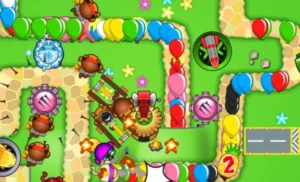
Bloons Tower Defence 5, commonly called Bloons TD 5, is a strategy game where players must prevent waves of balloons, known as Bloons, from reaching the end of a predefined path.
Players achieve this by placing defensive towers around the map.
Each tower has different abilities, attack ranges and upgrade options. Some towers fire darts, while others use explosives, freezing attacks or specialised weapons.
Players begin with a limited amount of in-game money and must decide which towers provide the best defensive value.
As Bloons are destroyed, players earn additional money that can be used to purchase stronger towers or improve existing defences.
However, later waves introduce more demanding balloon types, including faster Bloons, those requiring multiple hits and special types with resistances.
Success depends on understanding which towers work effectively together rather than relying exclusively on one powerful defence.
Rules:
- Prevent Bloons from reaching the end of the track.
- Place towers in suitable positions.
- Earn money by destroying incoming Bloons.
- Upgrade towers to improve their effectiveness.
- Use appropriate towers against special Bloon types.
- Maintain enough lives to survive each round.
- Complete the required waves to win the selected game mode.
Gameplay:
- Tower placement: Positioning determines how effectively towers attack incoming Bloons.
- Tower upgrades: Players can improve damage, range and specialised abilities.
- Bloon varieties: Different Bloons require different defensive strategies.
- Resource management: Money must be allocated between new towers and upgrades.
- Multiple maps: Different track layouts change the optimal defensive approach.
- Progressive waves: The difficulty increases as stronger Bloons appear.
Recommended For:
- Players who enjoy tower defence games.
- Strategy enthusiasts who like planning ahead.
- Players interested in resource management.
- Gamers who enjoy experimenting with different defensive combinations.
4. Papa’s Pizzeria

How to Play:
Papa’s Pizzeria is a restaurant management game where players take responsibility for preparing pizzas and serving customers.
Players must manage four main stages of pizza preparation: taking orders, adding toppings, baking pizzas and cutting them into slices.
Each customer has specific requirements, including topping placement, cooking time and how the pizza should be sliced.
The challenge is not simply to prepare a pizza. Players must complete each order accurately while managing several customers.
As the restaurant becomes busier, players need to organise their tasks efficiently.
For example, while one pizza is baking, it may be possible to prepare another customer’s order.
The game rewards accuracy, organisation and good time management. Players receive performance scores based on how closely they follow customer instructions.
Poorly arranged toppings, incorrect cooking times and uneven slices can reduce customer satisfaction.
Rules:
- Take each customer’s order carefully.
- Add the correct toppings in the requested positions.
- Bake pizzas for the required duration.
- Cut pizzas according to the customer’s instructions.
- Avoid keeping customers waiting unnecessarily.
- Serve the correct pizza to each customer.
- Earn higher scores by completing orders accurately.
Gameplay:
- Order management: Players collect and organise customer requests.
- Topping preparation: Ingredients must be arranged correctly.
- Cooking control: Baking times influence customer satisfaction.
- Pizza cutting: Players must create the requested number of slices.
- Customer ratings: Performance depends on speed and accuracy.
- Increasing workload: Additional customers make later shifts more demanding.
Recommended For:
- Players who enjoy cooking games.
- Fans of restaurant management simulations.
- Casual gamers who prefer mouse-based controls.
- Players interested in time-management challenges.
- Beginners looking for colourful simulation games.
5. Bloxorz

How to Play:
Bloxorz is a logic puzzle game where players control a rectangular block and guide it across a series of narrow platforms.
The objective is to position the block correctly so that it falls through a square opening at the end of each level.
Unlike traditional maze games, movement depends on how the block rotates.
Using the arrow keys, players can tip the block forwards, backwards or sideways.
Because the block occupies different amounts of space depending on whether it is standing upright or lying flat, every movement affects the next available position.
Some levels introduce switches that activate bridges or change the layout of the playing area.
Players must carefully calculate their movements to prevent the block from falling off the platform.
The game is particularly challenging because a single incorrect move can make it impossible to reach the target.
Bloxorz is also featured among the logic-based selections associated with Unblocked Games 6x.
Rules:
- Move the rectangular block using the arrow keys.
- Keep the entire block on the platform.
- Avoid falling into empty spaces.
- Activate switches when necessary.
- Use bridges and special tiles to reach new areas.
- Position the block upright above the final opening.
- Drop the block into the hole to complete the level.
Gameplay:
- Block rotation: Players roll a rectangular block instead of moving a conventional character.
- Spatial reasoning: Each move changes the block’s orientation.
- Pressure switches: Special tiles can activate pathways or mechanisms.
- Narrow platforms: Limited space makes positioning increasingly important.
- Puzzle progression: Levels introduce more complicated platform arrangements.
- Careful planning: Players must consider several moves before committing.
Recommended For:
- Players who enjoy logical puzzles.
- Fans of puzzle games unblocked that require careful planning.
- Players interested in spatial reasoning.
- Gamers who prefer slower, strategic challenges.
- Beginners wanting to develop puzzle-solving techniques.
6. Duck Life
How to Play:
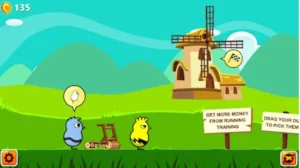
Duck Life is a racing and training simulation game where players raise a duck and prepare it to compete against other ducks.
The game begins with a relatively inexperienced duck that needs to improve its abilities before participating in more demanding races.
Players develop different skills through a series of training activities.
In the original game, the main training disciplines include running, swimming and flying.
Each activity has different controls and challenges, requiring players to adjust their approach.
Successful training increases the duck’s abilities, making it more competitive in races.
Players can also earn in-game coins and use them to purchase food and support progression.
Rather than winning purely through quick reactions during races, success largely depends on preparing the duck beforehand.
The game combines lighthearted visuals with an upgrade system that encourages players to continue improving their performance.
Rules:
- Train the duck in the available disciplines.
- Improve its abilities before entering difficult races.
- Avoid obstacles during training activities.
- Collect rewards where the training mode allows.
- Maintain sufficient energy for racing.
- Participate in competitions after adequate preparation.
- Win races to unlock further progression.
Gameplay:
- Running training: Players practise avoiding obstacles while moving forwards.
- Swimming training: Water-based exercises improve swimming ability.
- Flying training: Players practise controlling movement through airborne challenges.
- Skill progression: Training increases the duck’s effectiveness.
- Race competitions: Trained ducks compete against computer-controlled opponents.
- Coin collection: In-game currency supports additional development.
Recommended For:
- Players who enjoy animal-themed games.
- Beginners looking for simple arcade activities.
- Fans of training and progression systems.
- Players who enjoy casual racing games.
- Younger gamers who prefer colourful, lighthearted challenges.
7. The World’s Hardest Game

How to Play:
The World’s Hardest Game is a precision-based arcade puzzle game where players control a small red square and attempt to navigate increasingly difficult levels.
The objective is to move the square from its starting position to the designated finishing area while avoiding moving blue circles.
Although the controls are straightforward, the game requires extremely accurate timing.
Players generally use the arrow keys to control movement in four directions.
Each level features a different arrangement of moving obstacles.
Some blue circles travel in predictable lines, while others create patterns that are difficult to navigate without careful observation.
Players may also need to collect yellow coins before reaching the exit.
The green areas serve as safe zones or checkpoints in certain levels, giving players opportunities to plan their next movement.
The game becomes especially challenging when several moving obstacles overlap, leaving only narrow opportunities to pass through safely.
Rules:
- Control the red square using the arrow keys.
- Avoid touching moving blue circles.
- Collect all required yellow coins.
- Reach the designated finishing area.
- Use safe zones when available.
- Observe obstacle patterns before moving.
- Restart or return to the relevant checkpoint after collisions, depending on the level.
Gameplay:
- Precision movement: Small changes in direction can determine success.
- Moving obstacles: Blue circles follow patterns that must be understood.
- Timing challenges: Players must identify safe movement opportunities.
- Coin collection: Some levels require additional objectives before completion.
- Safe zones: Certain areas allow players to pause and plan.
- Repeated attempts: Failure encourages players to refine their approach.
Recommended For:
- Players who enjoy extremely difficult arcade games.
- Gamers who prefer precision challenges.
- Players interested in pattern recognition.
- Fans of trial-and-error gameplay.
- Experienced players seeking demanding browser games.
8. Fancy Pants Adventures
How to Play:
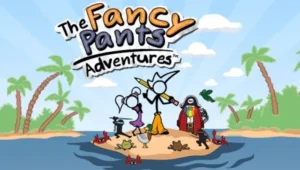
Fancy Pants Adventures is a side-scrolling platform game featuring a stick-figure character known for his distinctive orange trousers and fluid movement.
Players guide the character through colourful environments filled with slopes, platforms, enemies and hidden areas.
Unlike many traditional platform games, Fancy Pants Adventures places considerable emphasis on movement momentum.
Running down slopes, jumping between platforms and using the environment effectively can help players maintain speed.
The character can perform different movement actions, including jumping, sliding and running, depending on the game version.
Levels contain enemies that players must avoid or defeat, along with collectible squiggles scattered throughout the environment.
Exploration is also important because some stages include alternative routes and hidden sections.
The game becomes more enjoyable as players learn how to combine different movements without interrupting their momentum.
Rules:
- Guide the character through each level.
- Avoid dangerous obstacles and enemies.
- Use jumps to cross platforms and gaps.
- Collect squiggles while exploring.
- Maintain control when moving at high speeds.
- Explore alternative paths when available.
- Reach the end of the stage to progress.
Gameplay:
- Fluid movement: Running and jumping create a fast platforming experience.
- Momentum mechanics: Slopes and movement speed influence navigation.
- Collectibles: Squiggles encourage exploration.
- Enemy encounters: Players must avoid or defeat enemies.
- Hidden routes: Some levels reward curiosity and experimentation.
- Distinctive animation: Smooth character movement is a major part of the game’s appeal.
Recommended For:
- Players who enjoy classic platform games.
- Fans of Sonic-style momentum mechanics.
- Gamers who appreciate smooth character animation.
- Players interested in exploration and collectibles.
- Casual gamers looking for action-oriented browser adventures.
9. Learn to Fly 2

How to Play:
Learn to Fly 2 is a physics-based distance game where players help a penguin improve its flying capabilities through repeated launch attempts and equipment upgrades.
The penguin begins with relatively limited equipment, making early flights short and difficult to control.
Players launch the penguin and attempt to travel farther by maintaining a suitable flight angle and making effective use of available equipment.
After each attempt, the game awards in-game money based on performance.
This money can be invested in upgrades such as improved launch equipment, gliders and additional propulsion.
The gameplay follows a progression system where repeated attempts help players reach greater distances.
Players must also consider flight physics.
A steep flight angle may provide temporary height but can reduce forward speed. Flying too low may cause the penguin to lose altitude before travelling far enough.
Successful players balance speed, altitude and available equipment to improve their results.
Rules:
- Launch the penguin using the available equipment.
- Control the flight angle during each attempt.
- Maintain forward momentum for as long as possible.
- Use additional equipment when it becomes available.
- Earn money from completed flights.
- Purchase upgrades to improve future attempts.
- Complete objectives associated with the selected game mode.
Gameplay:
- Flight physics: Speed, altitude and angle influence performance.
- Equipment upgrades: Better equipment improves launch and flight capabilities.
- Distance progression: Players aim to travel farther during each attempt.
- Earning system: Successful flights provide in-game currency.
- Multiple objectives: Different modes introduce distinct progression goals.
- Repeated experimentation: Players can test different launch strategies and upgrade combinations.
Recommended For:
- Players who enjoy physics-based arcade games.
- Fans of upgrade and progression systems.
- Casual gamers who enjoy repeated improvement.
- Players interested in distance challenges.
- Beginners looking for simple but rewarding gameplay.
10. Riddle School

How to Play:
Riddle School is a point-and-click adventure game where players help a student named Phil Eggtree escape from school.
Unlike action games that rely on running or jumping, Riddle School focuses on observation, exploration and logical thinking.
Players interact with classrooms, hallways and other areas by clicking on objects and characters.
Throughout the adventure, they must discover useful items and work out how those objects can help them progress.
Some items are hidden in ordinary surroundings, while others require players to solve smaller puzzles before they become available.
The challenge comes from understanding which objects are important and how they relate to the escape objective.
Players may need to speak with characters, examine their environment or revisit previously explored areas after finding a new clue.
The game features a cartoon art style and humorous dialogue, making its escape-room structure more lighthearted than horror-based alternatives.
Rules:
- Explore available rooms and hallways.
- Click on objects to investigate them.
- Collect useful items.
- Interact with characters when necessary.
- Use collected objects to solve environmental puzzles.
- Look for clues that reveal possible escape routes.
- Find a way out of the school to complete the adventure.
Gameplay:
- Point-and-click controls: Most actions are performed using the mouse.
- Object interaction: Players investigate items throughout the environment.
- Inventory puzzles: Collected objects may help unlock new areas.
- Character dialogue: Conversations can provide useful clues.
- Exploration: Players move between different school locations.
- Logical progression: Solving one puzzle often provides access to another.
Recommended For:
- Players who enjoy point-and-click adventures.
- Fans of mystery and puzzle-solving games.
- Beginners who prefer mouse-based controls.
- Players interested in humorous storytelling.
- Casual gamers who enjoy escape challenges.
Players who enjoy investigating rooms, collecting clues and solving environmental puzzles may also appreciate other escape room games unblocked.
How Can You Play Flash Games Without Adobe Flash Player?
Adobe discontinued Flash Player support on 31 December 2020 and began blocking Flash content in the original player on 12 January 2021.
As a result, modern versions of Chrome, Firefox, Edge and Safari do not provide the original Flash plugin.
However, this does not mean that classic Flash games have disappeared.
Several preservation and conversion technologies allow players to access older games.
HTML5 Game Versions
HTML5 is one of the most convenient methods for playing browser games.
Some Flash titles have been converted, rebuilt or officially released using modern web technologies.
These versions can work directly in compatible browsers without requiring the original Flash Player.
Their advantages include easier browser integration, compatibility with modern operating systems and, where the developer has implemented them, improved touchscreen controls.
However, players should recognise that an HTML5 remake may differ slightly from the original game in graphics, physics or features.
Ruffle Flash Emulator
Ruffle is an open-source Flash emulator designed to run Flash content through modern technologies.
It allows many original Flash games to operate without the discontinued Adobe plugin.
Some websites automatically integrate Ruffle into their game players. This means visitors may simply open a compatible game page and start playing.
However, not every Flash game is completely compatible.
Games developed using certain Flash features, external resources or complex ActionScript functionality may experience bugs, missing features or loading problems.
Preserved Flash Game Collections
Some digital preservation projects maintain older Flash games so they remain accessible after the original technology’s retirement.
These collections may use browser-based emulation or dedicated desktop software.
For players who want to explore several game categories, established unblocked games websites offer another way to discover browser-based titles, although each game’s technology, availability and permissions should be checked independently.
Which Flash Games Are Best for Different Players?
The strongest choice depends on whether a player prefers strategic thinking, quick reactions, co-operative challenges or relaxed gameplay.
| Player Preference | Recommended Game | Main Benefit |
| Beginners | Duck Life | Simple training activities |
| Two-player gaming | Fireboy and Watergirl | Co-operative puzzles |
| Strategy | Bloons TD 5 | Tactical planning |
| Fast action | Run 3 | Reflex-based movement |
| Difficult challenges | The World’s Hardest Game | Precision and timing |
| Logical puzzles | Bloxorz | Spatial reasoning |
| Cooking simulation | Papa’s Pizzeria | Time management |
| Platform adventures | Fancy Pants Adventures | Fluid character movement |
| Physics challenges | Learn to Fly 2 | Flight experimentation |
| Mystery adventures | Riddle School | Observation and problem-solving |
For shorter sessions, Run 3, Bloxorz and The World’s Hardest Game provide challenges that can be attempted individually.
Players who want progression over several sessions may prefer Bloons TD 5, Duck Life or Learn to Fly 2.
Fireboy and Watergirl is particularly suitable for players who want to co-operate rather than compete.
Are Flash Games Unblocked Safe to Play?
Flash games can be safe to play through reputable websites using maintained browser technologies, but safety depends on how the game is hosted.
The discontinued Adobe Flash Player should not be installed simply because an unfamiliar website claims it is required.
Players should also distinguish between legitimate game preservation and websites that distribute unauthorised downloads or misleading software.
Several precautions are worth considering:
- Avoid outdated plugins: Do not install the discontinued Flash Player.
- Check website security: Prefer reputable websites using HTTPS.
- Avoid suspicious downloads: Browser games should not unexpectedly require executable files.
- Review advertisements: Avoid misleading buttons that imitate game controls or download prompts.
- Protect personal details: Do not provide unnecessary account or payment information.
- Keep browsers updated: Modern security updates help reduce exposure to known vulnerabilities.
- Check network permissions: Follow the internet-use policies of schools, colleges and workplaces.
An important distinction is that browser-playable and unblocked do not necessarily mean the same thing.
A Flash game may work perfectly through a modern browser but still be unavailable because a network administrator has restricted access to gaming websites.
Can Flash Games Unblocked Work on Mobile Devices?
Some classic Flash games can run on mobile devices, but compatibility is less predictable than on desktop computers.
The main difficulty is that many original Flash games were designed for keyboard and mouse controls.
For example, Run 3 requires responsive movement and jumping, while Fireboy and Watergirl traditionally uses two sets of keyboard controls.
A browser emulator may successfully load these games without automatically providing suitable touchscreen controls.
The mobile experience depends on several factors:
- Whether the game has been converted to HTML5.
- Whether the hosting website supports touchscreen input.
- Whether the emulator provides usable virtual controls.
- Whether the game fits the device’s screen dimensions.
- Whether the device has sufficient performance to run the game smoothly.
Mouse-driven titles such as Papa’s Pizzeria or Riddle School may be easier to adapt to touchscreen interfaces, but that does not guarantee every preserved version will support touch input correctly.
Players wanting the closest experience to the original Flash games will generally benefit from using a laptop or desktop computer with a keyboard and mouse.
Why Are Classic Flash Games Still Popular?
Flash games remain appealing because they focus on straightforward entertainment rather than complicated installations or extensive game systems.
Many classic titles introduce their main objectives almost immediately.
Players do not usually need to complete a lengthy tutorial before understanding the basic mechanics.
Their popularity also reflects several broader gaming preferences.
Short gaming sessions: Individual levels and challenges are often suitable for limited periods of free time.
Nostalgic gameplay: Many players remember Flash games from early browser gaming platforms.
Varied game design: Classic collections include everything from physics puzzles to restaurant simulators.
Simple mechanics: Games often use a small number of controls while gradually increasing the difficulty.
Replay value: High scores, upgrades, unlockable levels and increasingly difficult challenges encourage players to return.
One of the defining strengths of Flash-era gaming is that relatively simple concepts can create surprisingly demanding gameplay.
Bloxorz demonstrates this through block movement, while The World’s Hardest Game builds considerable difficulty around a small square and moving obstacles.
Rather than relying on realistic graphics or complicated systems, these games make their core mechanics the centre of the experience.
FAQs About Flash Games Unblocked
Can you still play Flash games in 2026?
Yes. Many classic Flash games remain playable through HTML5 versions, Ruffle emulation and preserved collections, although some original titles still experience compatibility problems.
Do Flash games require Adobe Flash Player?
No. Compatible HTML5 versions and browser-based emulators can run many classic games without the discontinued Adobe Flash Player.
Are Flash games unblocked free?
Many classic Flash games are available to play for free. However, individual websites may display advertisements, require accounts or offer paid features.
Which Flash game is best for beginners?
Duck Life, Papa’s Pizzeria and Fireboy and Watergirl are good starting points because their basic objectives are relatively easy to understand.
Can Flash games run on Chromebooks?
Yes. Compatible HTML5 games and Ruffle-powered Flash games can run on supported Chromebooks, although performance, controls and network access may vary.
Are unblocked Flash games multiplayer?
Some are. Fireboy and Watergirl supports local co-operative play, while other classic Flash games may offer competitive or online multiplayer features depending on the version.
Why do some old Flash games show a blank screen?
A blank screen may indicate an unsupported Flash feature, missing game files, blocked scripts, an emulator issue or an incompatible browser. Trying a maintained version may resolve the problem.