
Players searching for how to play FC 27 beta can currently take part only if they have been selected by Electronic Arts for the EA SPORTS FC 27 Closed Beta.
The FC 27 Closed Beta began on 5 August 2026 at 5pm UTC, which was 6pm BST in the UK, and is scheduled to finish on 25 August 2026 at 5pm UTC.
It is available in the United Kingdom, but access is restricted to invited players rather than being an open download available to everyone.
Selected players receive a beta code through the email address connected to their EA Account. That code can then be redeemed for the platform specified in the invitation before the beta is downloaded and launched.
What Is the EA SPORTS FC 27 Closed Beta?

The EA SPORTS FC 27 Closed Beta is a pre-release test version of FC 27. It gives selected players access to portions of the game before the final release so EA can test gameplay, online connectivity, features and other systems.
A closed beta differs from an open beta because not everyone can participate.
EA explains that closed beta places are limited and players have to be selected. Beta testing is intended to collect feedback, identify problems and help developers make improvements before release.
That also means players should not treat everything they see in the beta as representative of the finished version. Features, balancing, menus, gameplay behaviour and available modes can change.
How to Play FC 27 Beta Step by Step?
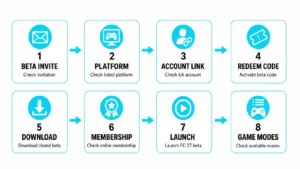
Step 1: Check for an FC 27 Beta Invitation
The first requirement is an official invitation.
EA sends an FC 27 Closed Beta code to the email address linked to the selected player’s EA Account. Players who have not received an invitation email have not been selected for the current beta.
EA also states that its customer support advisers cannot manually provide a beta code or confirm whether an account will receive one.
Players checking their inbox should also look in:
- Spam or junk folders
- Promotions folders
- The email account registered with EA
The sender and links should be checked carefully before entering account details anywhere.
Step 2: Check the Platform Listed in the Invitation
The beta invitation should be read carefully before the code is redeemed.
EA SPORTS FC 27 Closed Beta is available on several platforms, but the invitation and code are associated with the player’s selected access.
Supported platforms include:
- PlayStation 5
- PlayStation 4
- Xbox Series X|S
- Xbox One
- PC through Steam
- PC through the EA app
- Nintendo Switch
- Nintendo Switch 2
Players should avoid assuming that receiving an invitation for one platform automatically provides beta access on another.
EA also states that beta codes are personal and cannot be transferred to another account or shared with another player.
Step 3: Check the EA Account and Platform Connection
Before redeeming the code, the player should make sure the correct EA Account is being used.
This is particularly important for anyone with multiple EA, PlayStation, Xbox or Steam accounts.
EA recommends connecting the platform account selected for the Playtest or beta to the correct EA Account. Incorrect account linking can create problems when trying to access the test.
For Steam, for example, EA says players can check their EA Account’s Connected Accounts section and link the relevant Steam account.
Console accounts may connect automatically when the same email details are used, although some users may be required to sign in and complete the linking process when launching an EA game.
Players should be cautious about unlinking accounts simply to fix a beta problem. EA applies restrictions to some account relinking situations.
Step 4: Redeem the FC 27 Beta Code
Once the correct account and platform have been confirmed, the next step is redeeming the code supplied by EA.
EA provides an official product-code redemption process.
For eligible PC codes through EA, players can:
- Sign in using the relevant EA Account.
- Open the EA redemption page or EA app.
- Select the option to redeem a code.
- Enter the FC 27 Closed Beta code exactly as supplied.
- Check the product and account details.
- Confirm the redemption.
In the EA app, EA’s general redemption process is to open My Library and choose Redeem Code.
Console players should follow the redemption instructions supplied for their platform or in their invitation email.
Codes should not be bought from unofficial sellers or exchanged with strangers. EA states that FC 27 Closed Beta codes are intended specifically for the player who receives them.
Step 5: Download the FC 27 Closed Beta
After successful redemption, the beta should become available through the appropriate game library or platform.
The exact interface differs between platforms, but the general process is:
Redeem code → Open game library → Find FC 27 Closed Beta → Download → Install
Players should make sure they are downloading the Closed Beta rather than another EA SPORTS FC product.
A reasonably stable internet connection and sufficient free storage should also be available before beginning the download.
If the code has been accepted but the beta cannot be downloaded, EA specifically recommends using its Beta Code Tool, which can help with code errors, download problems and confirmation of invitation status.
Step 6: Check Online Membership Requirements
The FC 27 Closed Beta requires an internet connection and EA Account.
For console participation, EA’s official beta rules also state that players need an active subscription to the relevant online service, including:
- Xbox Game Pass
- PlayStation Plus
- Nintendo Switch Online
The exact requirement depends on the platform being used.
PC players do not have an equivalent PlayStation Plus or Nintendo Switch Online requirement listed by EA for the beta.
Step 7: Launch the FC 27 Beta
Once installation is complete, the player can launch the Closed Beta from the platform’s game library.
An internet connection must remain available because the beta requires online access.
Players must also accept EA’s required agreements, including its User Agreement, Privacy and Cookie Policy and the Pre-release Feedback Agreement before participating.
After authentication, the account should be given access to the beta content assigned by EA.
Step 8: Check Which FC 27 Modes Are Available
Not every beta participant necessarily receives identical game modes.
EA says that the invitation email tells each player which game modes are available to their account. Modes and features can also be changed, enabled or updated during the beta testing period.
This is important because one player may see content that another invited player cannot access.
EA has confirmed that The Grounds is available to beta participants on compatible platforms:
- PC through Steam or EA app
- Xbox Series X|S
- Nintendo Switch 2
Other beta modes can depend on the individual invitation and EA’s current testing requirements.
Which Platforms Can Play the FC 27 Beta?

EA has confirmed a broad platform list for the current test.
| Platform | FC 27 Closed Beta |
| PlayStation 5 | Yes |
| PlayStation 4 | Yes |
| Xbox Series X|S | Yes |
| Xbox One | Yes |
| PC – EA app | Yes |
| PC – Steam | Yes |
| Nintendo Switch | Yes |
| Nintendo Switch 2 | Yes |
However, The Grounds does not have the same beta platform coverage as the overall Closed Beta. EA currently lists that mode for PC, Xbox Series X|S and Nintendo Switch 2 during the test.
How Can Players Get an FC 27 Beta Invite?
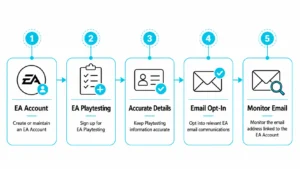
There is no method that guarantees an invitation.
EA says players can improve their eligibility for future beta opportunities by:
- Creating or maintaining an EA Account
- Signing up for EA Playtesting
- Keeping Playtesting information accurate
- Opting into relevant EA email communications
- Monitoring the email address linked to the EA Account
EA Playtests have limited spaces, and eligibility may depend on factors related to the game or platform being tested. Even receiving an invitation to apply for an EA Playtest does not necessarily guarantee final selection.
For FC 27 specifically, EA confirms that players are invited and that registering for Playtesting or opting into marketing emails does not guarantee Closed Beta access.
Can Players Download the FC 27 Beta Without a Code?
No general public download route has been announced for the current FC 27 Closed Beta.
The test is restricted to selected accounts, and EA sends beta codes to invited players. Someone who has not received an invitation cannot simply search a console or PC store and join as though it were an open beta.
EA customer support also cannot provide a beta code to an account that was not selected.
Players should therefore be cautious of websites, social media accounts or individuals claiming to sell guaranteed FC 27 beta access.
Does Pre-Ordering FC 27 Give Beta Access?

The Closed Beta should not be confused with FC 27 pre-order early access.
EA describes Closed Beta participation as an invitation-based process through its Playtesting and email systems. It does not list buying or pre-ordering FC 27 as a requirement for receiving Closed Beta access.
By comparison, EA currently advertises up to seven days of early access beginning 18 September 2026 with eligible FC 27 editions. That is access to the commercial game around launch and is separate from the August Closed Beta.
Therefore:
FC 27 Closed Beta = invite-only pre-release testing
FC 27 early access = launch-related access included with eligible editions
They are not the same thing.
Why Is the FC 27 Beta Code Not Working?
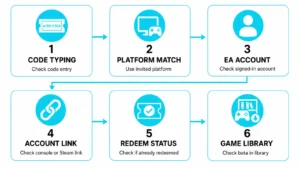
A beta code can fail for several reasons.
The player should first check:
- Whether the code has been typed correctly.
- Whether it is being redeemed on the platform stated in the invitation.
- Whether the correct EA Account is signed in.
- Whether the correct console or Steam account is linked.
- Whether the code has already been redeemed.
- Whether the beta product has appeared in the game library.
EA advises players experiencing beta-specific code or download problems to use its official Beta Code Tool. The tool can assist with redemption errors, download problems and invite-status checks.
EA’s general code guidance also recommends checking the instructions accompanying a code to make sure it is being redeemed in the correct place.
What If the FC 27 Beta Is Not Showing After Redemption?
If the code was accepted but FC 27 Closed Beta is missing, players should avoid immediately creating another EA Account.
Instead, they should verify:
- The account used to redeem the code
- The linked PlayStation, Xbox or Steam account
- The platform named in the beta invitation
- The game’s library or owned-games section
- Whether the download is available but has not automatically started
Incorrect account linking can prevent players from accessing Playtests and betas correctly, according to EA.
The Beta Code Tool should be the next option if those checks do not solve the problem.
Does FC 27 Beta Progress Carry Over?

No.
EA explicitly states that progress made during the FC 27 Closed Beta will not carry over to the full game.
Players should therefore approach the beta as a testing environment rather than an opportunity to build permanent progress before launch.
Items, results, teams, progression or other beta data should not be expected to transfer into the retail release.
Can Players Stream or Upload FC 27 Beta Gameplay?
No.
This is one of the most important rules surrounding the Closed Beta.
EA states that players must not:
- Stream Closed Beta gameplay
- Post beta gameplay
- Capture and distribute beta material
- Share content from the Closed Beta forums
Breaking these restrictions can result in loss of beta access and exclusion from future opportunities. EA also warns that shared material may be removed and streaming channels could receive strikes.
Players should therefore read the Pre-release Feedback Agreement carefully before recording, streaming or publishing anything relating to their beta session.
How Can Players Report FC 27 Beta Bugs?
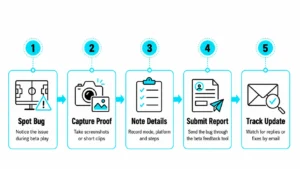
Finding bugs is part of the purpose of a beta test.
Players with beta access can submit problems and feedback through the FC 27 Closed Beta forums. Access to those beta forums is restricted to eligible participants who have logged into the Closed Beta using the appropriate EA Account.
Useful feedback normally explains:
- What happened
- What the player expected to happen
- Which mode was being played
- Which platform was being used
- Whether the issue can be reproduced
Players should report issues through authorised feedback channels rather than publicly sharing restricted beta footage.
FC 27 Beta FAQs
Is the FC 27 beta live now?
Yes. As of 10 August 2026, the EA SPORTS FC 27 Closed Beta is underway. EA states that it runs from 5 August 2026 at 5pm UTC until 25 August 2026 at 5pm UTC.
Is the FC 27 beta available in the UK?
Yes. The United Kingdom is one of the territories officially listed for the FC 27 Closed Beta, alongside Ireland, the United States and Canada excluding Quebec.
Is the FC 27 beta free?
The Closed Beta is accessed through an invitation and beta code rather than by purchasing the beta itself. However, EA says console participants need the appropriate active online subscription, such as PlayStation Plus, Xbox Game Pass or Nintendo Switch Online.
How old does someone need to be to play the FC 27 beta?
EA states that participants must be 18 years old or older.
Can FC 27 beta codes be shared?
No. EA says each Closed Beta code is intended only for the recipient and cannot be transferred to another account or another player.
Can FC 27 beta be played on PS4?
Yes. PlayStation 4 is included on EA’s official list of FC 27 Closed Beta platforms.
Can FC 27 beta be played on PS5?
Yes. PlayStation 5 is officially supported for the Closed Beta.